Valid Email Checker: How Unknown Results Save You Money
 Emmanuel KwartengJune 29, 2026
Your list looks clean. You exported it from your CRM, removed obvious duplicates, and it's ready to send. Then 2,300 of 10,000 emails bounce on the first campaign — and your sending domain spends the next six weeks clawing back a reputation it took months to build.
A valid email checker stops that from happening. Not by guessing which addresses look right, but by working through a multi-stage verification flow that tests whether each address can actually receive mail — before a single send leaves your server.
This guide covers exactly how that flow works, what each result status means for your sending strategy, and why the Unknown result — the one every other verifier charges you for — is the number you should be watching most closely.
What a valid email checker actually does
Most developers have written a regex to validate email format. That's syntax checking — it confirms the address looks right (has an @ symbol, a domain, a TLD). It catches typos like user@gmailcom. It does not tell you whether the mailbox exists.
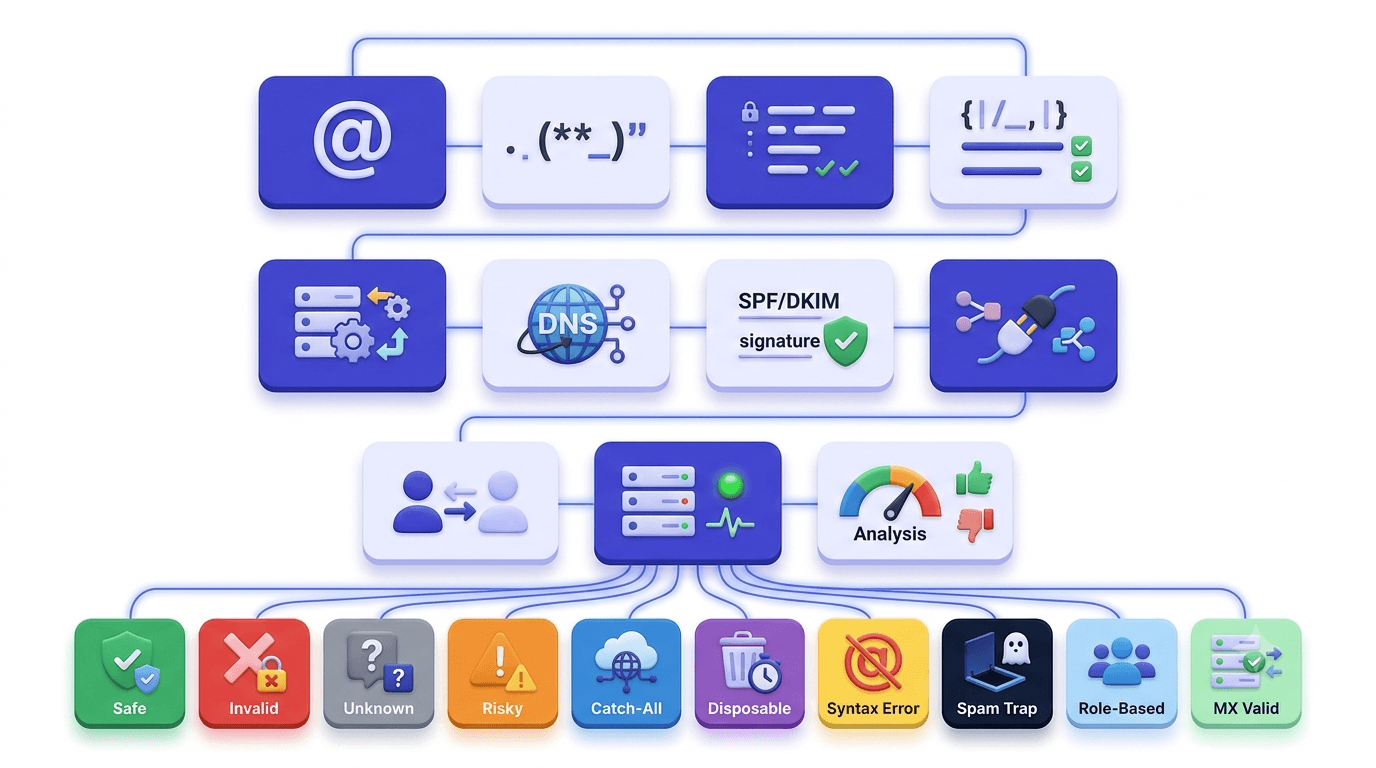
A full email verification tool goes several layers deeper. The 11-stage verification engine used by Valid Email Checker runs through this sequence for every address:
One thing worth clarifying up-front: no verification tool sends a real email to the address. The SMTP handshake is a silent probe — the verifier connects to the receiving mail server, announces the address, and reads the server's response without ever delivering a message. The recipient never sees it happen.
The flow produces one of 10 possible outcomes: safe, risky, invalid, catch_all, disposable, role, spamtrap, disabled, inbox_full, or unknown. Each carries different implications for what you should do with the address. More on that in the next section.
The caveat: some mail servers actively block SMTP probes. When both verification attempts return a non-definitive answer, the result is unknown — not invalid, not safe. The address is genuinely unclassifiable with the information available. How a verifier handles that result is one of the most important things to compare across tools.
Why checking email validity matters before every send
The industry threshold that triggers ISP throttling is a hard bounce rate above 2%. Cross it once on a warm domain and you'll notice a deliverability dip. Cross it repeatedly and you risk blacklisting — a problem that takes weeks to resolve and affects every campaign on the same IP and domain, including transactional sends.
Bounces are the obvious risk. The subtler ones are harder to see in your dashboard:
- Role addresses — info@, support@, hello@, admin@ — are technically valid and won't bounce. But they land in shared inboxes monitored by multiple people, if anyone. Open rates on role addresses are consistently lower, dragging your engagement metrics and signaling to inbox providers that your list isn't opted-in.
- Spamtraps look identical to real addresses. They don't bounce. They don't open. They just record that you sent to them and report it. A maintained spamtrap database is the only way to catch these before they catch you.
- Disposable addresses are collected legitimately — someone used a 10-minute mail service to grab your lead magnet — and then expire within hours. They inflate your list count and decay your engagement rate simultaneously.
- Sender reputation compounds. One campaign with a 4% bounce rate doesn't just affect that campaign. It affects the domain's reputation on every subsequent send, including receipts and password resets your customers actually need.
The email deliverability pillar guide makes the case in full, but the short version is this: list quality is a prerequisite for deliverability, not an optional optimization. Authentication records (SPF, DKIM, DMARC) tell inbox providers who you are. A clean list tells them your mail is worth delivering.
How to read verification results and what to do with each status
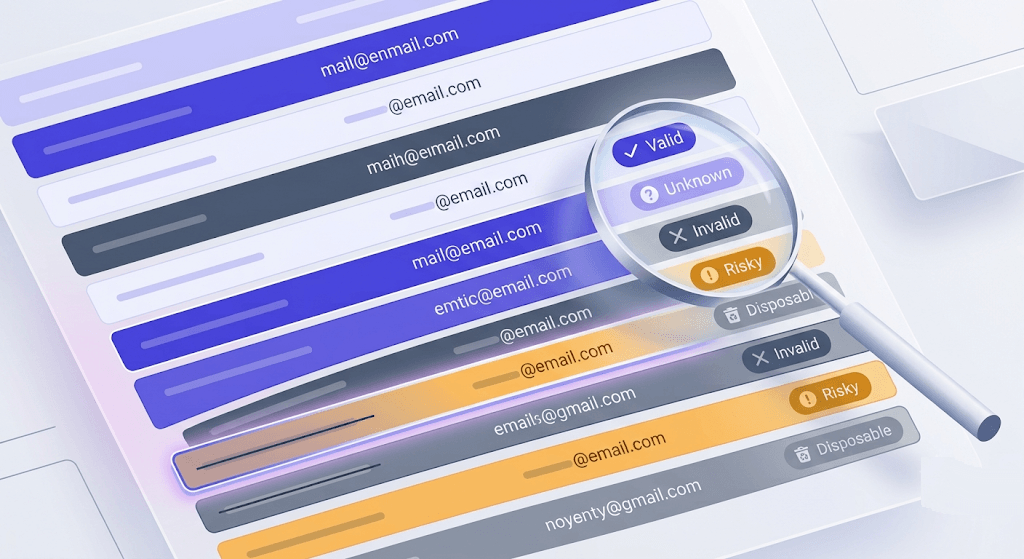
Getting results back is the easy part. Knowing what to do with each status is where most senders lose time. Here's the decision framework, status by status. For a deeper reference, the complete status guide covers edge cases and ISP-specific behavior.
- Safe — send freely. The mailbox exists, accepts mail, and passed all checks.
- Risky — segment carefully. The mailbox is real but carries elevated bounce risk (recently migrated domain, low-engagement history, or similar signals). Acceptable for transactional mail to opted-in users; suppress from cold outreach.
- Catch-all — treat as unverifiable. The domain is configured to accept every incoming address, which means the server can't tell you whether the specific mailbox exists. Evaluate by domain reputation, not by the verification result alone. See the catch-all complete guide for suppression strategies.
- Disposable — remove immediately. These addresses are designed to expire. There's no scenario where keeping them improves your metrics.
- Role — suppress from marketing campaigns. If the role address is genuinely the intended recipient for a transactional message (a support ticket confirmation going to support@), that's fine. For broadcast sends, remove them.
- Spamtrap — hard remove, no exceptions. Sending to a known spamtrap is one of the fastest ways to get blacklisted.
- Disabled — hard remove. The account has been permanently shut down by the provider.
- Inbox full — remove for now, optionally re-verify in 30 days. The mailbox exists but is over quota. It may recover; it may not.
- Unknown — hold, don't delete. The address couldn't be classified, not because it's invalid but because the server blocked the probe. If you're on Valid Email Checker, this result was refunded automatically.
Check an address right now
Paste any email and see the full 11-stage result — including status, MX data, and catch-all flag.
Powered by Valid Email Checker — full SMTP handshake, disposable + role detection, no card required.
Single-address vs bulk verification: when to use each
The use case determines the method. Running both interchangeably wastes either speed or credits.
Single-address verification is the right tool for real-time validation at the point of collection — signup forms, CRM entry, pre-send spot checks. The single verification endpoint returns a result in under a second, which is fast enough to validate inline before a form submits. Catching a bad address at the door is cheaper than cleaning it out of a list later.
Bulk verification handles full list hygiene: before a campaign, after a list purchase, after any period of dormancy longer than 90 days. The bulk verification walkthrough covers the upload process in detail. For jobs over 50,000 addresses, the system splits the work into chunks and processes them in a queue — results come back via polling, not instantly. Plan for that when scheduling campaigns.
Sample before you commit
Before running a full 100K verification job, pull a random 5–10% sample first. If 40% of 5,000 addresses come back invalid, you've just learned the full list is probably unusable — and you've spent 5% of the credits to find out instead of 100%.
The API path sits between the two: embed verification at the point of collection so bad addresses never enter your system. The API overview covers authentication, endpoints, and rate limits. For developers building signup flows, the single-address endpoint is the right integration point — it's synchronous and returns the full status classification in the response body.
The Unknown result problem — and why auto-refund matters
Here's the thing most verifier comparison posts skip entirely: Unknown results are not a rare edge case. On cold B2B lists — especially ones targeting enterprise domains that run Microsoft 365 or Google Workspace with aggressive probe-blocking — Unknown rates of 5–15% are normal.
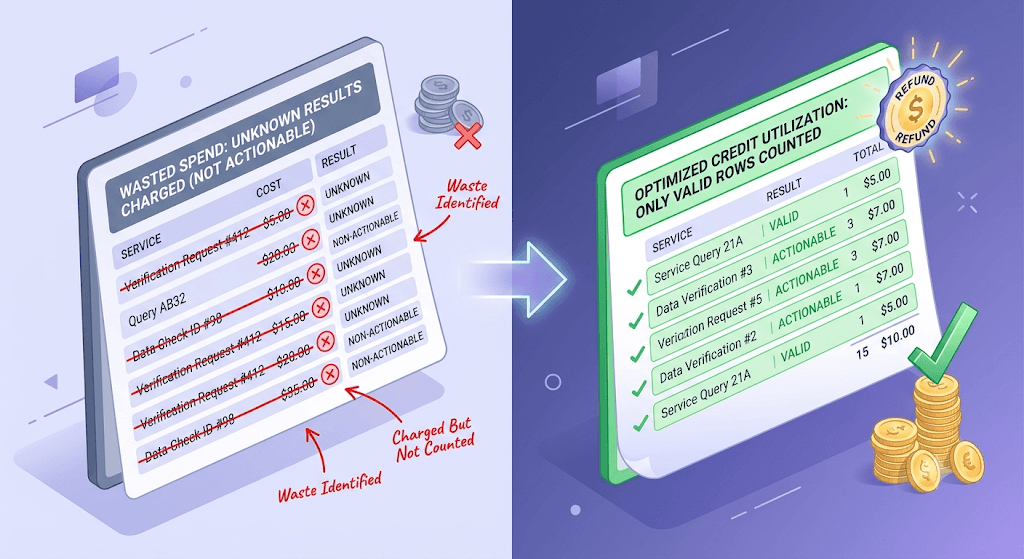
Every other major verifier charges a credit for Unknown results. You pay the same whether the tool returned safe or returned ¯\_(ツ)_/¯. That's a meaningful cost difference on large lists.
Valid Email Checker automatically refunds every Unknown result. No support ticket. No review period. The credit posts back to your account as soon as the result is classified — you can see it in your Credits History as "Refund: [email] returned unknown status." This is documented in our guarantee and backed by the actual refund logic in the verification engine, not a marketing claim.
What does that mean for your effective cost? Here's the math:
Say you're on a PAYG plan at $0.003 per credit and you verify 10,000 addresses. A competitor with a 10% Unknown rate charges you for all 10,000 — $30 total, 9,000 actionable results. With Valid Email Checker, the 1,000 Unknown credits are refunded. You pay $27 for the same 9,000 actionable results. On a 100,000-address job with a 12% Unknown rate, that difference is $36 back in your account — automatically.
The bulk email verifier guide goes deeper on this comparison if you're evaluating tools on a large list.
What separates a reliable checker from a fast one
Speed is easy to market. Accuracy is harder to fake over time. Here's what to actually evaluate when comparing verification tools:
- Catch-all detection quality. A naive implementation flags any domain that doesn't reject a probe as catch-all. Better implementations test with a known-fake address first to distinguish a real catch-all from a server that just accepted the specific address.
- Spamtrap database freshness. Recycled traps — old legitimate addresses repurposed as traps after years of inactivity — are the hardest to catch. A stale trap database misses them entirely.
- Disposable domain coverage. Valid Email Checker checks against 111,000+ known disposable domains, refreshed weekly. The list grows faster than most tools update — coverage matters.
- Dual-provider failover. When one upstream provider times out, a second provider attempts the verification before the result is classified as Unknown. This directly reduces your Unknown rate before the auto-refund even kicks in.
- Result classification granularity. A binary valid/invalid output is almost useless for sophisticated list management. Ten statuses give you enough signal to make different decisions for different segments — rather than suppressing everything that isn't
safe.
The competitors on the top SERP — Verifalia, Hunter, Email Hippo — all lead with accuracy claims above 99% and none publish the methodology behind them. A claim without a dataset isn't accuracy; it's marketing. We don't publish a specific percentage either, because the honest answer is that accuracy varies by list type, domain configuration, and the specific date you verify. What we do publish is how the engine works and the refund policy that backs it up.
How to integrate email verification into your existing workflow
The right integration point depends on your technical setup and where bad data tends to enter your system.
Connect your ESP directly
Valid Email Checker has one-click sync integrations with 17 platforms — Mailchimp, HubSpot, Klaviyo, SendGrid, ActiveCampaign, ConvertKit, Drip, Mailgun, MailerLite, GetResponse, Campaign Monitor, AWeber, Constant Contact, Brevo, Elastic Email, Mailjet, and Moosend. Your list goes in dirty; the cleaned version lands back in the same audience. See the integrations overview for setup details.
Use the REST API for real-time validation
The single-address endpoint (
POST /functions/v1/api-verify-single) returns a full status classification in under a second — fast enough to validate inline at form submission. The bulk endpoint (POST /functions/v1/api-verify-bulk) handles campaigns asynchronously with queue-and-poll. Authenticate with an API key in theAuthorization: Bearerheader. The API key setup guide takes about three minutes.Upload a CSV for non-technical workflows
No API required. Upload a CSV or paste addresses directly into the dashboard. Results download in the same format with verification status appended as a column. The quick start guide walks through your first verification in under five minutes.
Set a re-verification schedule
Lists decay at roughly 22% per year — an address that was valid in January has a measurable chance of bouncing by October. Re-verify any list older than 90 days, any purchased or scraped list before first use, and any list where a recent campaign exceeded a 1.5% bounce rate. The list hygiene decision framework has a full re-verification trigger matrix.
Free tool · no signup
Verify a full list — bulk upload, no API needed
Upload a CSV, get results with 10 status classifications. Unknown results refunded automatically.
Common mistakes people make when checking email validity
Most verification mistakes aren't technical. They're process failures — doing the right thing at the wrong time, or skipping a step that seems redundant until it isn't.
- Treating catch-all as valid. A catch-all domain accepts every address you throw at it, including
xjk92837@company.com. The verification result tells you the domain accepts mail; it tells you nothing about whether the specific mailbox exists. Sending to unvalidated catch-all addresses is how you introduce a hidden bounce risk into a list that looks clean on paper. - Skipping role-address filtering on marketing sends. info@, admin@, support@, hello@ — these pass SMTP verification with no problem. They just don't engage. Including them in broadcast campaigns drags your open rate, and a sustained low open rate is itself a deliverability signal inbox providers track.
- Verifying once and never again. A list verified in January is not a clean list in October. People change jobs, companies shut down, domains expire. The reduce bounce rate guide puts the annual decay rate at around 22% — that's one in five addresses going stale within a year.
- Relying on syntax checking alone. The free regex validator in your framework of choice catches format errors. It does not connect to the receiving mail server, check MX records, or probe for mailbox existence.
user@totally-real-domain-that-doesnt-exist.compasses regex. It won't pass MX lookup. - Running a full verification job without sampling first. If you have 100,000 addresses from a list purchase, run 5,000 first. If 40% come back invalid, you've learned the list is low quality — and you've spent 5% of the credits to find out instead of 100%.
The myths around email verification
If you've heard that verification is only necessary for cold lists, or that your ESP handles it for you, the email verification myths post addresses both directly. The short answer: ESPs flag bounces after they happen; verification prevents them before.
Free tool · no signup
Check an email address free
Single-address verification with full 11-stage breakdown. 150 free credits on signup, no card required.
The standard behind the handshake
The SMTP probe that sits at the core of email verification isn't a hack — it's how the protocol is designed to work. RFC 5321, the specification that defines SMTP, describes exactly the handshake sequence a verifier uses: EHLO, MAIL FROM, RCPT TO, QUIT. The server's response to RCPT TO is what determines whether the address is accepted. A 250 means yes; a 550 means no; anything else is the ambiguity that produces Unknown results.
Google's email sender guidelines reinforce why list hygiene matters from the receiver's side: senders who exceed bounce thresholds face delivery restrictions, and those restrictions apply at the domain level — not just to the offending campaign. Verifying before you send is the simplest way to stay on the right side of that line.
If you're building list hygiene into a larger deliverability strategy, the email deliverability checker gives you a sender reputation snapshot alongside your list quality data — both signals in one place.
Frequently asked questions
What is a valid email checker and how does it work?
Does email verification send an actual email to the address?
What does 'catch-all' mean in email verification results?
safe results and should be evaluated by domain reputation rather than treated as verified.Why do I get charged for Unknown results, and is there a way to avoid it?
How often should I re-verify my email list?
What is the difference between an invalid email and a disposable email?
Can I verify emails in bulk without an API?
What bounce rate threshold should trigger a full list re-verification?
The fastest way to see where your list stands is to run a sample through verification and read the status breakdown. A healthy list is mostly safe with a small risky tail. A list that's been sitting for six months looks different — and the difference shows up in your next campaign's bounce rate if you don't check first. The tool below handles the check.
Try Valid Email Checker free
Verify any email in under a second
Get 150 free verifications. No credit card. Auto-refund on every Unknown result — the only verifier we know that does this.
- 150 free credits when you sign up
- Auto-refund every Unknown verification (we're the only ones that do)
- 11-stage flow catches what 1-step checkers miss
- Drop-in integrations for Mailchimp, HubSpot, SendGrid, 14 more
Written by
Emmanuel KwartengEmmanuel is the founder of Valid Email Checker. He spends most of his time in bounce logs, verification data, and the gap between what email vendors promise and what actually happens when you hit send. He started the company because too much deliverability advice is guesswork dressed up as best practice, and he writes here to cut through it with the numbers behind each claim.