Free Email Verifier: What You Actually Get (and What Competitors Hide)
 Emmanuel KwartengJune 12, 2026
About 1 in 5 marketing emails never reaches an inbox. Most senders blame the algorithm. The real culprit is usually the list.
By the end of this guide you'll know exactly what a free email verifier does, where the gaps are, and how to read your results well enough to make a real decision before your next send.
The most important thing you'll learn: not all verifiers charge the same way for uncertainty — and that difference changes the math on what "free" is actually worth.
What a free email verifier actually does (and what it skips)
A legitimate email verifier runs a sequence of checks on an address before it ever touches your sending infrastructure. The five core stages every credible tool covers:
- Syntax check — does the address conform to RFC 5322? Missing @ symbol, illegal characters, malformed domain — caught here.
- MX record lookup — does the domain have mail servers configured to receive email? A domain with no MX record is a guaranteed bounce. You can run this yourself with our MX record checker.
- SMTP handshake — the verifier connects to the mail server and initiates a conversation without sending a message. The server's response codes reveal whether the domain is accepting mail.
- Mailbox-existence probe — within that SMTP session, the verifier asks whether the specific mailbox exists. The server's accept or reject response is the closest thing to ground truth available without actually sending.
- Catch-all detection — some domains are configured to accept mail for any address, valid or invented. The verifier probes with a known-fake address to detect this.
Here's the deal: "free" in the verifier market almost always means one of three things — a credit cap (usually 100–200 addresses), no bulk upload, or a freemium funnel designed to get you to a paid plan. That's not a criticism; it's just the business model. The question is whether the free tier is useful for your actual workflow.
The one result free tools consistently mishandle is the Unknown status — the case where the mail server responds ambiguously and the verifier genuinely can't determine whether the address is live or dead. Most tools classify it, charge the credit, and move on. You pay for uncertainty. We'll come back to this.
One thing worth clarifying: a real verifier never sends an actual email to the address it checks. The SMTP handshake simulates the beginning of a mail delivery conversation, then terminates cleanly. If a tool claims it verifies by sending a message, that's not verification — that's a ping that will get your IP flagged.
Verification vs. validation
Validation checks whether an address is syntactically correct — the format is right, the domain exists. Verification goes further: it checks whether the specific mailbox will accept mail right now. A validated address can still hard-bounce. A verified address has passed a live SMTP check. Most free tools sold as "validators" are doing syntax checks only. If the tool never mentions SMTP, it's not verifying anything.
The hidden cost of Unknown results
Unknown means both SMTP providers queried the address and neither returned a definitive answer. The mailbox could be live. It could be dead. The server refused to say. This happens more than people expect — cold B2B lists built from scraped data, recently migrated domains, and Microsoft 365 tenants with aggressive SMTP policies all produce high Unknown rates.
The standard industry practice: charge the credit anyway. You asked for a result, the system ran the checks, here's what it found. That logic makes sense from a billing perspective. It makes less sense when you're cleaning a cold list of 10,000 B2B contacts and 15% of them come back Unknown — you've spent 1,500 credits and learned nothing actionable about those addresses.
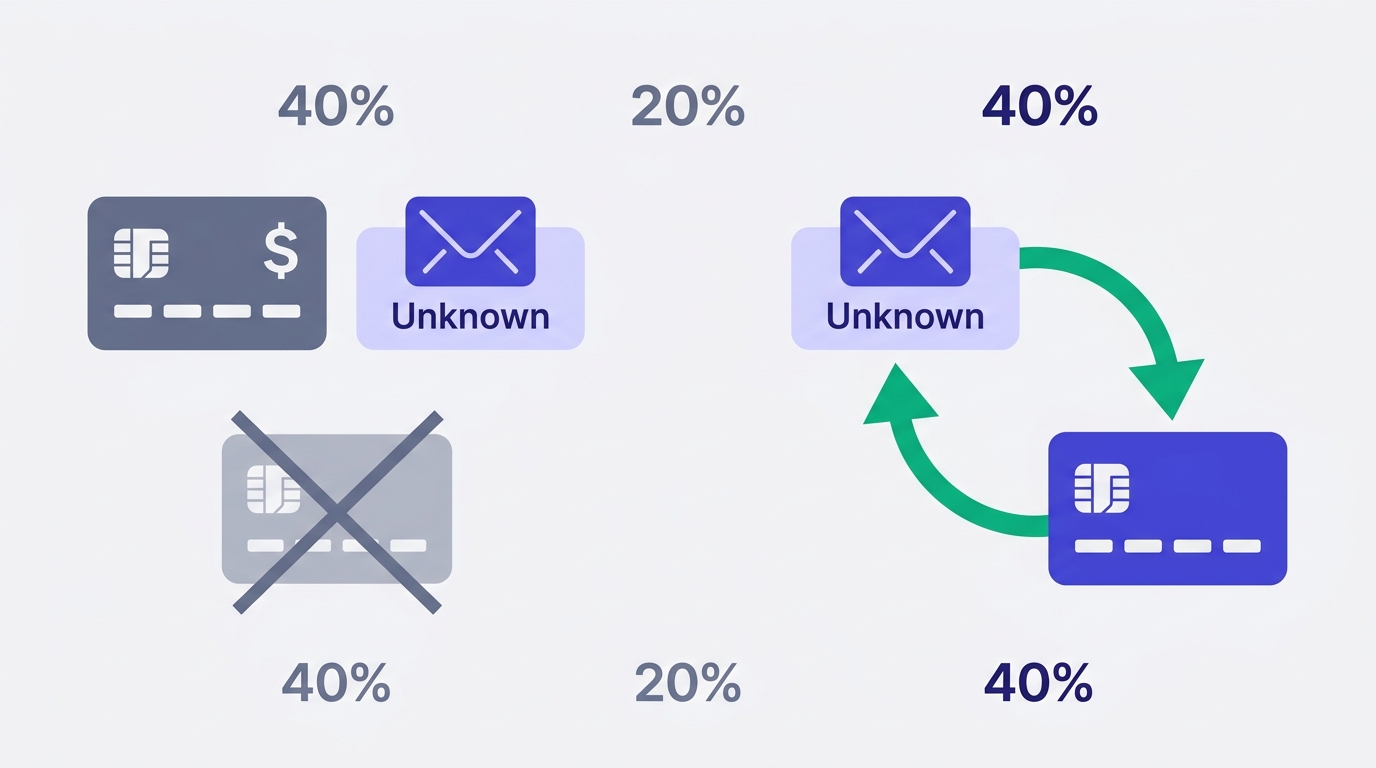
Valid Email Checker handles this differently. Every Unknown verification triggers an automatic credit refund — no support ticket, no grace period, no fine print. The refund posts directly to your Credits History as: "Refund: [email] returned unknown status." The credit only gets consumed when the engine returns one of the nine other statuses — something you can actually act on. You can read more about how this works in our refunds and credit returns guide.
Why does this matter more than the accuracy percentage competitors advertise? Because accuracy claims are measured against easy datasets — clean consumer lists where most addresses are clearly valid or clearly dead. The hard cases are the Unknown results. That's where the economics of verification actually play out, and that's where most tools quietly charge you for nothing.
If you're working with cold outreach lists or older B2B data, read our post on bulk email verifier economics and Unknown refunds — it goes deeper on the math.
The 11 checks Valid Email Checker runs on every address
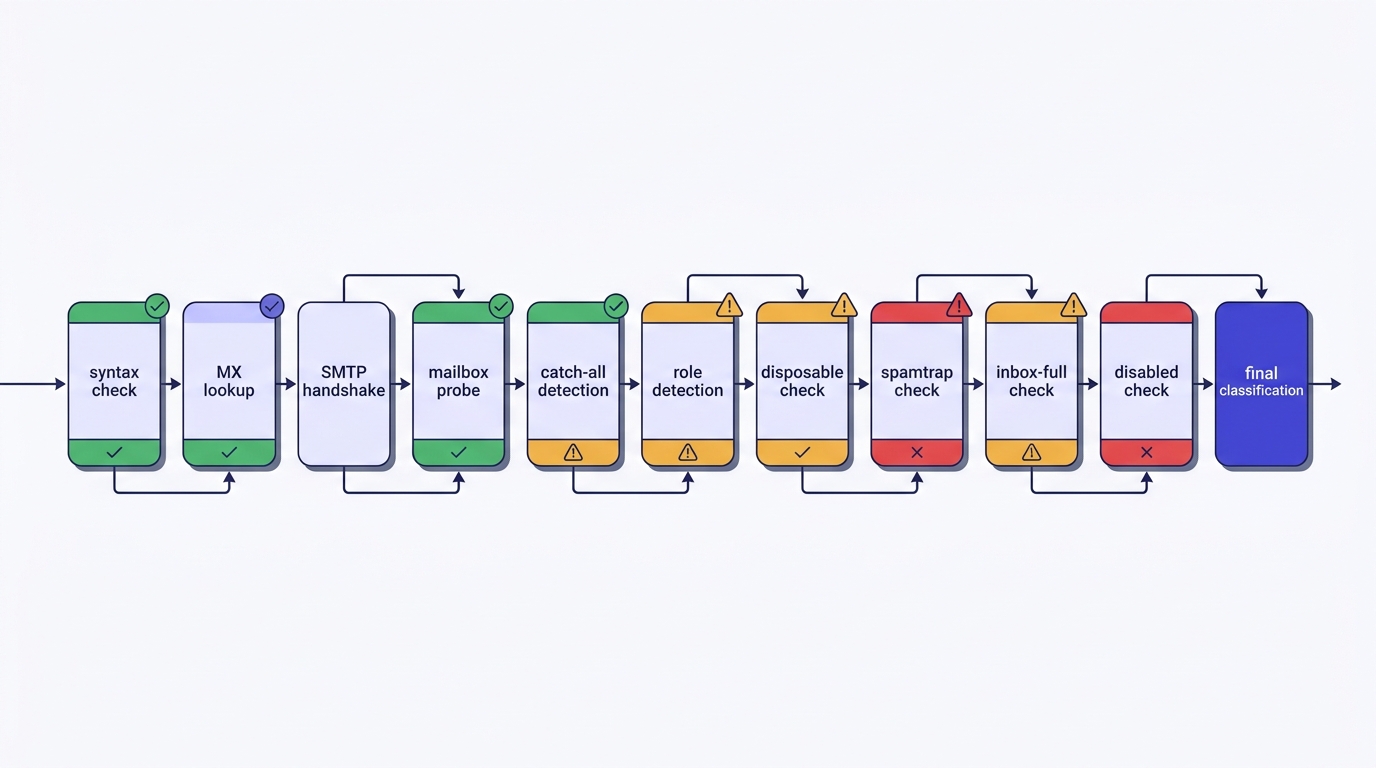
Most verifiers describe their process as three or four steps. The actual flow needed to classify an address accurately has eleven distinct stages. Here's what each one catches:
Syntax → MX → SMTP → Mailbox probe → Catch-all are the five core stages described above. The remaining six are where most verifiers stop doing real work:
- Role-address detection — addresses like info@, admin@, support@, and hello@ are typically shared inboxes managed by teams or filtered by ticketing software. They may be technically valid but they're almost never the right person to contact, and they suppress engagement rates across your entire domain. Cold senders should remove them; transactional senders can keep them with eyes open.
- Disposable and burner domain screening — our engine checks against 111,102 known disposable email domains. These are addresses created to bypass signup forms and expire within minutes or days. Including them in a campaign wastes credits and skews your engagement data.
- Spamtrap detection — spamtraps are addresses operated by blocklist providers and ISPs specifically to catch senders with poor list hygiene. Hitting one can get your sending domain added to a blocklist within a single campaign. This is the result that ends careers.
- Disabled-account detection — the account existed but the provider has permanently closed it. This is distinct from a hard bounce in that the address once worked; it's also distinct from inbox-full, which is temporary.
- Inbox-full detection — the mailbox is over quota and temporarily can't accept mail. Most verifiers fold this into 'invalid.' We surface it separately so you can re-verify the address in 30 days rather than permanently suppressing a contact who might be valuable.
- Two-provider failover — if the first SMTP provider returns an inconclusive response, the second runs automatically. Only if both return inconclusive does the result classify as Unknown — and that credit gets refunded.
The full technical walkthrough of the 11-stage engine is in our help center if you want to understand the SMTP mechanics behind each stage.
Check an address right now
Paste any email below — see all 11 stages of the result, free.
Powered by Valid Email Checker — full SMTP handshake, disposable + role detection, no card required.
How to read your verification results
Valid Email Checker returns one of ten statuses for every address. Knowing what each one means before you build your suppression list saves you from two common mistakes: being too aggressive (removing addresses you could send to) and not aggressive enough (keeping addresses that will hurt you).
The full status breakdown is in our result types guide, but here's the decision-relevant summary:
- safe — real mailbox, will accept mail. Send.
- risky — real mailbox, elevated bounce probability. Low-engagement domain, recent migration, or behavioral signals. Worth sending to for warm lists; suppress from cold outreach.
- invalid — syntax failure, MX failure, or SMTP rejection. Hard-bounce guaranteed. Remove immediately.
- unknown — both providers returned non-definitive answers. Credit refunded automatically. Treat as unverified and decide based on list age and source quality.
- catch_all — the domain accepts all mail regardless of mailbox existence. Mailbox-level confirmation is impossible. Segment separately; don't mix with verified safe addresses.
- disposable — burner address. Remove from all lists.
- role — shared inbox (info@, admin@, etc.). Remove from cold lists; evaluate for transactional flows.
- spamtrap — hard remove, no exceptions, investigate how this address entered your list.
- disabled — account permanently closed. Remove.
- inbox_full — temporary. Flag for re-verification in 30 days if the contact is high-value.
The catch-all result deserves more attention than most guides give it. A domain that accepts all mail is configured that way deliberately — often by IT teams who don't want to expose which mailboxes exist. That doesn't mean the specific address you're checking is dead. It means you can't know. The practical answer: send catch-all addresses on a separate, lower-frequency cadence and watch the bounce and engagement data after the first send. Our complete guide to catch-all emails covers the nuances.
Before your next send, build a suppression list from your results: invalid + spamtrap + disabled + disposable are hard removes. Role addresses come out of cold sequences. Catch-all addresses go into a separate segment. Risky addresses stay only if the list is warm. That process takes about 10 minutes and it's the most direct lever you have on bounce rate.
Free tier vs. paid: where the line actually falls
Valid Email Checker gives every new account 200 free credits at signup — no card required. One credit equals one verification, and Unknown results don't consume a credit. That 200-address free tier is enough to audit a meaningful sample of any list, validate a new lead source, or test a signup form integration before you commit to a paid plan.
What competitors offer looks similar on the surface but differs in the details. Most charge for Unknown results, which means their free tier is effectively smaller than the headline number on cold or B2B data. The comparison is cleanest when you measure credits consumed per actionable result, not credits granted.
| Valid Email Checker | Typical free-tier verifier | |
|---|---|---|
| Free credits at signup | 200 | 25–100 |
| Unknown results charged? | No — auto-refunded | Yes |
| Bulk upload on free tier | Yes (CSV) | Usually no |
| 11-stage verification | Yes | Typically 3–5 stages |
| ESP integrations | 17 platforms | None or 1–2 |
| API access | Included | Paid plans only |
When free is enough: spot-checking a new lead source before importing it, validating individual addresses from inbound leads, testing your signup form's verification logic, or auditing a small segment before a one-off send.
When free isn't enough: cleaning a list of 5,000+ addresses before a campaign, running ongoing API verification at signup volume, or managing a contact database across multiple ESPs. At that scale you're looking at PAYG credits (no expiry within your bucket window) or a monthly subscription. Our pricing and credit guide covers the tradeoffs between the two models.
Cold senders typically prefer PAYG — campaign volume is irregular and paying per-send makes more sense than a monthly commitment. ESP-integrated marketers running continuous campaigns usually find the subscription model cheaper per credit. The quick start guide walks through the decision in five minutes.
Free tool · no signup
Verify your first 200 emails free
No card required. Unknown results don't consume a credit.
Connecting your ESP in three clicks
Exporting a list, uploading it to a verifier, downloading the cleaned file, and re-importing it is the workflow most senders use. It works. It's also slow, error-prone, and creates a window where your ESP audience and your verified data are out of sync.
Valid Email Checker has one-click integrations with 17 platforms: Mailchimp, HubSpot, Klaviyo, SendGrid, ActiveCampaign, ConvertKit, Drip, Mailgun, MailerLite, GetResponse, Campaign Monitor, AWeber, Constant Contact, Brevo, Elastic Email, Mailjet, and Moosend.
The sync works in one direction that actually matters: your list goes in dirty, and the verified results land back in the same audience segment in your ESP. Invalid and spamtrap addresses get flagged or removed based on your settings. You don't touch a CSV. The integrations overview covers the auth flow for each platform — most use API key authentication and take under three minutes to configure.
The practical routine that works for high-volume senders: verify every new subscriber batch within 24 hours of import. For Mailchimp and Klaviyo users especially, this prevents the slow accumulation of stale addresses that drives bounce rates up over a 6–12 month period. If you're running cold outreach from Apollo or LinkedIn-sourced data, the verification step belongs before the first send — our posts on Apollo email verification and LinkedIn email finders go into the specifics.
Using the API for real-time verification
The most powerful place to run verification isn't on your existing list — it's at the point of capture. Verifying an address the moment someone submits your signup form means bad addresses never enter your database.
Valid Email Checker's single-email endpoint (POST /functions/v1/api-verify-single) returns a result in under a second — fast enough to validate inline before the form submission completes. Authentication is an API key in the Authorization: Bearer header. Full endpoint documentation is in the API overview.
const response = await fetch('https://api.validemailchecker.com/functions/v1/api-verify-single', {
  method: 'POST',
  headers: {
    'Authorization': 'Bearer YOUR_API_KEY',
    'Content-Type': 'application/json'
  },
  body: JSON.stringify({ email: 'name@company.com' })
});

const result = await response.json();
// result.status: 'safe' | 'invalid' | 'risky' | 'unknown' | ...
console.log(result.status);
For bulk jobs, the async endpoint (POST /functions/v1/api-verify-bulk) accepts lists chunked at 50,000 addresses per task. You submit the job, get a task ID back, then poll GET /functions/v1/api-get-results until the job completes. This is the right pattern for large list cleaning — not a synchronous request that holds a connection open for minutes. See the bulk verification endpoint guide for the full queue-and-poll flow.
The verification cadence that holds up in practice: verify at signup, then re-verify any list segment older than 6 months before a campaign send. Email addresses churn at roughly 2–3% per month — a list that was clean in January has meaningful decay by July. The API rate limits and error handling guide covers what to do when the server responds with a non-200 status.
What to do with your results before the next send
Results are only useful if you act on them before the campaign goes out. Here's the decision tree, compressed:
Hard removes — no exceptions
invalid, spamtrap, and disabled addresses come off every list, every time. Spamtraps especially: Google's sender guidelines and most major ISPs treat spamtrap hits as evidence of poor list hygiene, and a single campaign that hits enough of them can get your sending domain flagged. If you find a spamtrap in a purchased list, stop sending to that list entirely until you've verified every address.
Judgment calls — segment, don't delete
catch_all addresses go into a separate segment. Send them once on a lower-frequency cadence and watch the bounce rate on that specific segment after the send. role addresses (info@, admin@, support@) stay on transactional flows but come off cold sequences. disposable addresses come off everything — they were never real contacts.
Risky addresses — flag and re-verify
risky means the mailbox is real but has elevated bounce probability. For high-value contacts — decision-makers you've already had a conversation with — flag them and re-verify in 30 days before the next touch. For cold outreach at volume, suppress them. The bounce rate math doesn't work in your favor at scale.
Set the bounce-rate threshold as your guardrail
Most ESPs flag accounts when bounce rate exceeds 2% on a campaign. Some set the warning at 5%, but that's too late — by the time you hit 5%, sender reputation damage is already accumulating. Keep your verified list as the only thing you send to, and your bounce rate stays structurally below 1%. That compounds: lower bounce rate → better sender reputation → higher inbox placement over time. That's the actual ROI of list hygiene.
If your deliverability has already taken a hit, verification is part of the fix — but only part. Our post on email deliverability in 2026 covers the full picture, including the authentication requirements Google and Yahoo now enforce. And if you're building cold sequences, list quality is what determines whether your subject lines even get seen.
Free tool · no signup
Check your deliverability before the next send
See how your domain scores on inbox placement, authentication, and sender reputation.
Verification is the upstream fix. The fastest way to see where your list actually stands is to run a sample through the engine and read the failure mix — specifically what share comes back invalid, spamtrap, or disposable. That breakdown tells you more about your list source than any engagement metric will.
Frequently asked questions
Is a free email verifier accurate enough to use before a real campaign?
What happens when a verifier returns 'Unknown' — and do I still get charged?
What's the difference between a catch-all result and an invalid result?
How many free verifications do I actually get with Valid Email Checker?
Can I verify a bulk list for free, or is free limited to single addresses?
Does the verifier send an email to the address it's checking?
Which ESP integrations does Valid Email Checker support?
How often should I re-verify an existing email list?
Try Valid Email Checker free
Verify any email in under a second
Get 150 free verifications. No credit card. Auto-refund on every Unknown result — the only verifier we know that does this.
- 150 free credits when you sign up
- Auto-refund every Unknown verification (we're the only ones that do)
- 11-stage flow catches what 1-step checkers miss
- Drop-in integrations for Mailchimp, HubSpot, SendGrid, 14 more
Written by
Emmanuel KwartengEmmanuel is the founder of Valid Email Checker. He spends most of his time in bounce logs, verification data, and the gap between what email vendors promise and what actually happens when you hit send. He started the company because too much deliverability advice is guesswork dressed up as best practice, and he writes here to cut through it with the numbers behind each claim.