Encrypted email and sender reputation: why you need both
 Mara ChenJuly 19, 2026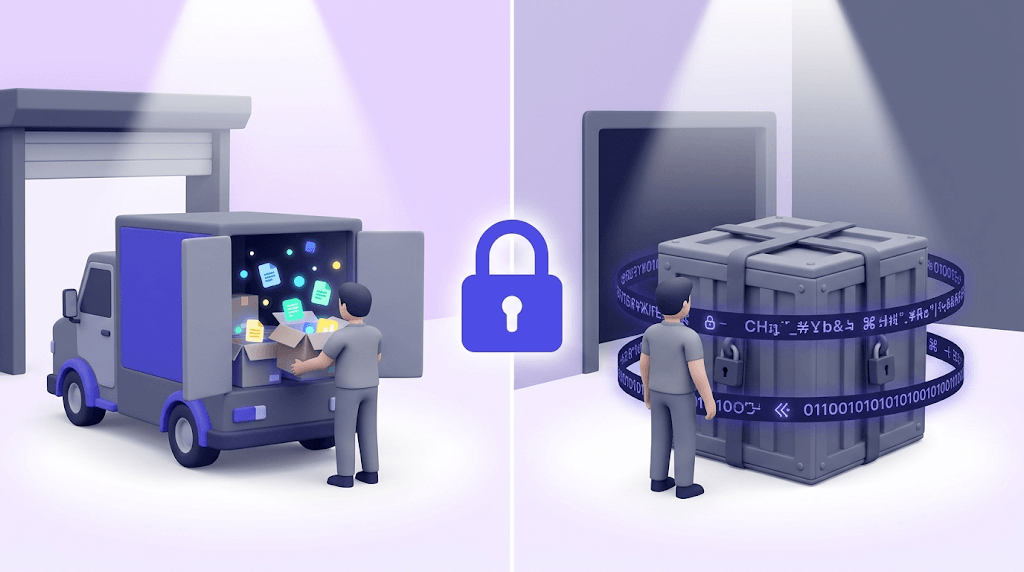
Encrypted email is one of those terms that sounds self-explanatory until you actually try to use it — and then you realize Gmail's little padlock icon means something very different from what Proton Mail calls encryption. Most people sending sensitive data believe their email is protected. Most of the time, it isn't. Not in the way they think.
By the end of this guide you'll know exactly which encryption type your current provider offers, which services give you genuine end-to-end protection, and — the part nobody else covers — why encryption does nothing to protect your sender reputation from bounces, catch-alls, and spamtraps.
The specific gap: privacy-focused senders spend weeks hardening their encryption setup, then blast a list full of stale addresses and wonder why their domain lands on a blacklist. Encryption and list hygiene are two separate layers. You need both.
What encrypted email actually means
Encryption is the process of scrambling a message into cipher text that only the intended recipient can reverse. The scrambling uses a mathematical key. Without the correct key, the cipher text is unreadable — it looks like random noise. With the key, it decodes back to the original message in milliseconds.
Here's where most guides skip a step: there are two very different places encryption can happen in an email's journey, and conflating them leads to serious false confidence.
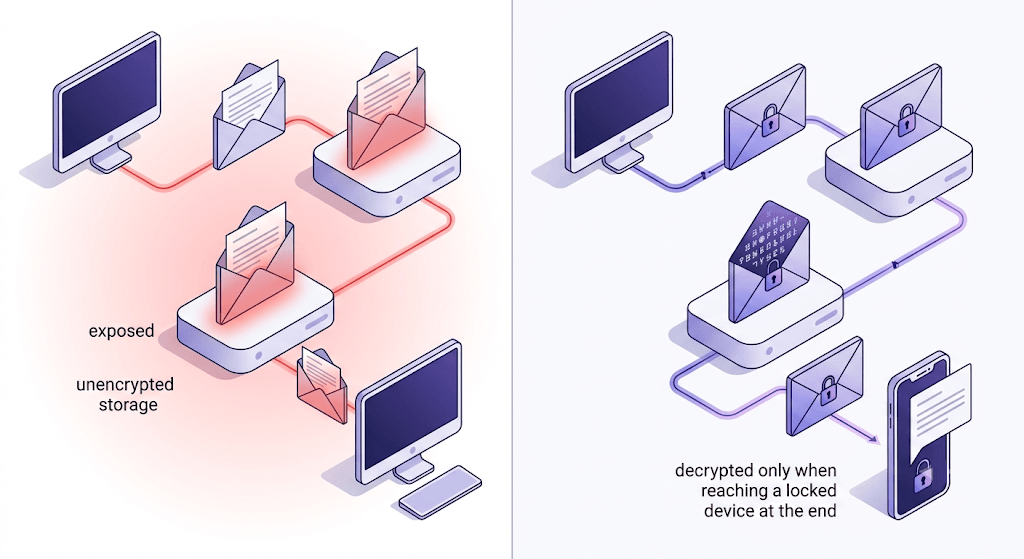
Transport-layer encryption (TLS) protects the connection between mail servers — the tunnel the message travels through. Think of it as an armored truck. The truck is secure. But when it parks at the warehouse (your email provider's server), the cargo gets unloaded and stored in a readable form. The provider can read it. Law enforcement with a warrant can read it. Anyone who breaches the server can read it.
End-to-end encryption (E2EE) is different. The message is encrypted on your device before it leaves and decrypted only on the recipient's device. The provider's server sees cipher text the whole time — even while storing it. No warehouse worker can read the cargo because the cargo never gets unpacked until it reaches its final destination.
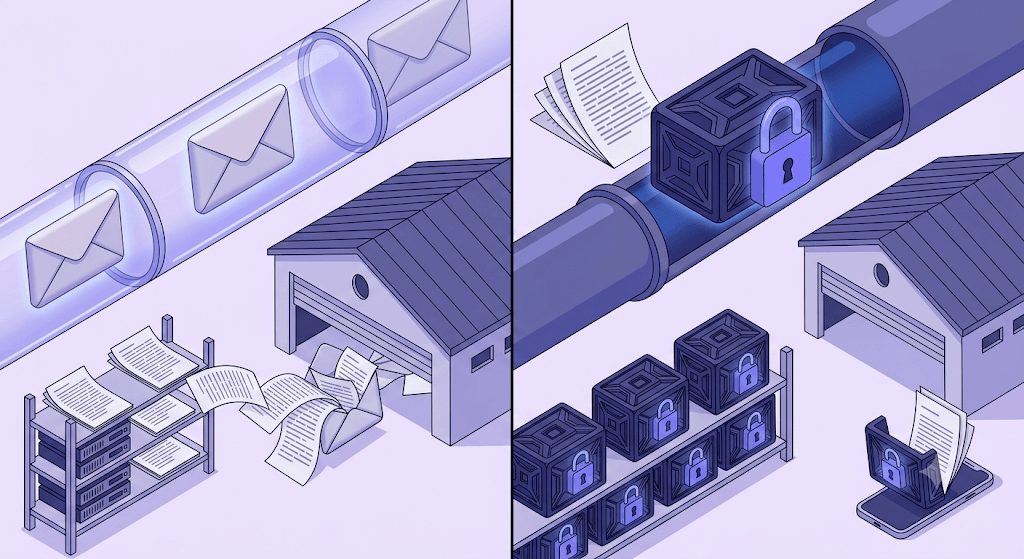
Default email — Gmail, Outlook, Yahoo — is closer to a postcard than a sealed letter. The message text is stored in clear text on provider servers. Google's own documentation acknowledges that automated systems scan messages to power features like purchase tracking and calendar event detection. That's only possible because Google can read the content.
The two main cryptographic mechanisms behind encrypted email are public-key cryptography (you share a public key anyone can use to encrypt a message to you; only your private key can decrypt it) and digital signatures (proof that the message came from you and wasn't altered in transit). These two concepts underpin S/MIME, PGP, and every provider that claims genuine E2EE.
One more clarification before moving on: even the best E2EE systems have limits. Metadata — who you emailed, when, and the subject line — is often exposed. The subject line in particular travels unencrypted in most implementations, including Proton Mail's external sends. If the subject line says 'Q3 acquisition target: Acme Corp,' the content encryption buys you less than you'd expect.
The three types of email encryption you'll actually encounter
There are dozens of encryption standards, but in practice you'll run into three.
TLS (Transport Layer Security) is the default everywhere. Gmail, Outlook, and Yahoo all use it. RFC 5321 — the SMTP spec — defines the STARTTLS extension that enables it. When you see a padlock in Gmail's compose window, that padlock means the connection to the receiving server supports TLS. It says nothing about what happens to the message once it arrives.
S/MIME (Secure/Multipurpose Internet Mail Extensions) is certificate-based. Your organization or a certificate authority (CA) issues you a digital certificate. You share your public certificate with the other party; they share theirs. After that exchange, you can send encrypted messages back and forth in Outlook, Apple Mail, or any S/MIME-capable client. The catch: both parties need certificates first, and managing those certificates across an organization is genuinely tedious. S/MIME is common in enterprises with IT departments — rare everywhere else.
PGP/OpenPGP uses a key-pair model without requiring a central certificate authority. You generate a public/private key pair. You publish your public key (to a keyserver, or just paste it in your email signature). Anyone who wants to encrypt a message to you uses your public key. Only your private key decrypts it. Proton Mail and Mailfence use OpenPGP for cross-provider encrypted messages, which is why they can interoperate with other PGP users.
Beyond these three, dedicated providers like Proton Mail and Tuta offer provider-level E2EE — zero-knowledge storage where even the provider cannot read your messages. This is the strongest model, but it only applies within their own ecosystem.
The Proton-to-Gmail problem
Sending from Proton Mail to a Gmail address is not end-to-end encrypted, regardless of what the sender believes. The message leaves Proton's encrypted infrastructure and arrives at Google's servers in a form Google can read. E2EE only holds when both endpoints support it.
What the major providers actually do (and don't) encrypt
The gap between marketing copy and actual encryption behavior is widest here. Here's what each major provider actually does.
Gmail uses TLS in transit and stores messages on Google's servers in a form Google can access. Google's automated systems process message content for features including purchase tracking and event detection. The 'Confidential Mode' that Google offers is not encryption — it's a DRM-style access control that prevents forwarding and sets an expiry date, but Google can still read the message.
Outlook / Microsoft 365 offers a genuine 'Encrypt' option in the Options ribbon on paid plans. Messages encrypted this way use Microsoft's Information Rights Management. The practical limitation: the encryption stays within the Microsoft 365 ecosystem. Send an encrypted Outlook message to a Gmail user and they receive a link to view the message in a browser — through Microsoft's servers, which Microsoft can access.
Yahoo and AOL use TLS in transit. Yahoo was caught in 2016 scanning customer emails in real time at the request of US intelligence agencies — a program that went beyond what peer providers acknowledged doing at the time. TLS transit is the full extent of Yahoo's encryption commitment.
Proton Mail is headquartered in Switzerland and stores messages with zero-knowledge E2EE — meaning Proton's own servers cannot decrypt your messages. Within the Proton ecosystem, E2EE is automatic. For external recipients (Gmail, Outlook, etc.), Proton can use OpenPGP if the recipient has a PGP key published, or send a password-protected link. Proton is subject to Swiss law, which is meaningfully different from the US CLOUD Act.
Tuta (formerly Tutanota) is based in Germany under German data protection law. Tuta uses a proprietary encryption standard rather than OpenPGP — this means it doesn't interoperate with other PGP providers, but it does give Tuta more control over the implementation, including encrypting subject lines (which Proton's external sends don't). External recipients get a time-limited secure link with a shared password.
PreVeil takes a different approach: it layers industrial-grade AES-256 plus elliptic-curve encryption on top of your existing Gmail or Outlook client. You keep your address, your interface, your contacts — PreVeil adds a separate encrypted channel that your provider cannot access. There's a free tier for individuals and enterprise pricing for teams.
When you actually need to encrypt an email
The answer isn't 'always.' Over-encrypting creates friction that people route around — they start copying sensitive data into Slack or sending it unencrypted from their phone because the secure process is too slow. The goal is to encrypt when the risk of exposure justifies the friction.
Encrypt when you're transmitting any of these to an external recipient:
- Social Security numbers, passport numbers, or government ID data
- Protected Health Information (PHI) — clinical trial data, medical records, lab results
- Credit card numbers, bank account details, salary data, compensation offers
- Legal documents in active litigation or M&A communications
- Trade secrets, unreleased product plans, source code
Yale IT's guidance on this is a useful frame: treat anything leaving your internal domain (anything addressed outside your .edu or corporate domain) as external, and apply encryption accordingly. The moment a message crosses provider boundaries, TLS is the only protection mainstream providers give you — and that's not enough for the data types above.
When NOT to bother: internal team messages on a secured corporate server with proper access controls, routine low-sensitivity correspondence, marketing emails to opted-in subscribers. Adding encryption to these creates overhead with no meaningful security gain.
How to send an encrypted email in the clients people already use
Outlook (Microsoft 365 Personal or Family)
Open a new message. Go to the Options ribbon. Click Encrypt. Choose 'Encrypt' (content and attachments only) or 'Do Not Forward' (restricts forwarding and printing as well). The recipient must be on Microsoft 365 or view the message via a browser link. This works without any certificate setup — it's the easiest path for occasional use.
Gmail — TLS is automatic, E2EE requires extra steps
Gmail handles TLS automatically; you don't configure anything. For genuine E2EE in Gmail, your realistic options are: (a) install the Mailvelope browser extension, which adds OpenPGP key management to the Gmail compose window, or (b) switch your sensitive correspondence to a dedicated encrypted provider and use a Gmail alias as a forwarding address for non-sensitive mail.
Apple Mail with S/MIME
Obtain a personal email certificate from a CA (Actalis offers free ones; Comodo/Sectigo charges). Install the certificate in macOS Keychain. In Apple Mail, open a new message — if you've exchanged certificates with the recipient, a lock icon appears next to the subject field. Click it to encrypt. Both parties must have completed the certificate exchange first.
Proton Mail (web or mobile app)
E2EE is on by default for Proton-to-Proton messages. For external recipients, Proton checks whether the recipient has a published PGP key — if yes, the message is encrypted end-to-end automatically. If not, you can set a message password; the recipient gets a link and enters the password to read the message. The password must be shared through a separate channel.
Tuta (web or mobile app)
Same default-on model as Proton for Tuta-to-Tuta. External recipients get a time-limited secure link. You set a shared password during composition and communicate it to the recipient out-of-band (phone, Signal, etc.). Tuta encrypts the subject line by default — a meaningful advantage over most competitors for genuinely sensitive correspondence.
The top encrypted email services compared
Jurisdiction matters as much as the encryption standard itself. US providers are subject to the CLOUD Act, which allows US law enforcement to compel data disclosure even when data is stored abroad. Swiss, German, Belgian, and Dutch law all operate under different frameworks — and that difference is real, not marketing.
| Service | Jurisdiction | Encryption standard | Free tier | OpenPGP interop | Subject line encrypted |
|---|---|---|---|---|---|
| Proton Mail | Switzerland | OpenPGP + zero-knowledge | 1 GB storage | Yes | No (internal only) |
| Tuta | Germany | Proprietary E2EE | 1 GB storage | No | Yes |
| Mailfence | Belgium | OpenPGP | 500 MB storage | Yes | No |
| PreVeil | USA* | AES-256 + elliptic curve | Free individual plan | No | No |
| StartMail | Netherlands | PGP | No free tier | Yes | No |
For personal use in 2026, Proton Mail and Tuta are the strongest options. Proton wins on interoperability (OpenPGP means you can exchange encrypted messages with any PGP user). Tuta wins on metadata protection (subject line encryption, stricter data minimization). Mailfence is worth considering if you're already in a PGP workflow and want Belgian law jurisdiction. StartMail is solid but has no free tier, which limits how easy it is to test before committing.
What encrypted email doesn't protect
This section is the one most guides skip. Encryption is a powerful tool with a narrow job description.
Metadata. Even in a fully E2EE system, the sender address, recipient address, timestamp, and often the subject line are visible to the provider and any network observer. Tuta encrypts subject lines; most others don't. If the metadata itself is sensitive — you're a journalist protecting a source — metadata exposure is a serious concern that content encryption alone doesn't address.
The recipient's security. E2EE is only as strong as the weakest endpoint. If the recipient's device is compromised, or they forward the decrypted message to an unencrypted inbox, the protection ends there. You encrypted your side; you can't control theirs.
Phishing and spoofing. Encryption authenticates content — it proves the message wasn't altered in transit. It does not prove the sender is who they claim to be. That's what SPF, DKIM, and DMARC do. You can receive a beautifully encrypted phishing email. The encryption just means the phish arrived unmodified. To verify your domain's sender authentication is solid, check your DMARC record and confirm your SPF is valid — those are separate from encryption and equally important.
Account compromise. If your password is weak or reused, your private key may be stored in a way that an attacker can access. The encryption is mathematically sound; the key management is the vulnerability. Use a strong, unique password and enable two-factor authentication on any encrypted email account.
Encrypted email and sender reputation — the part nobody mentions
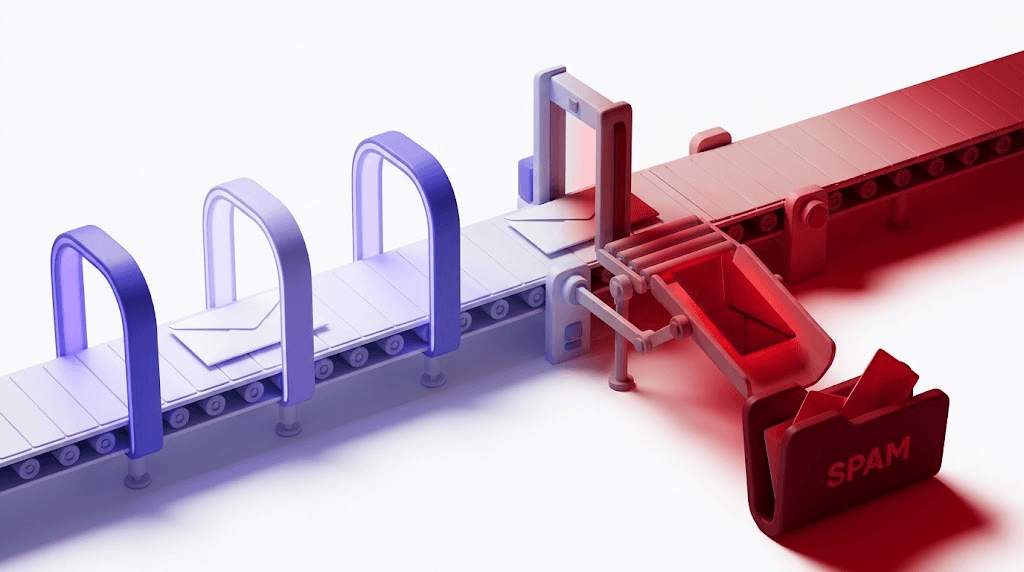
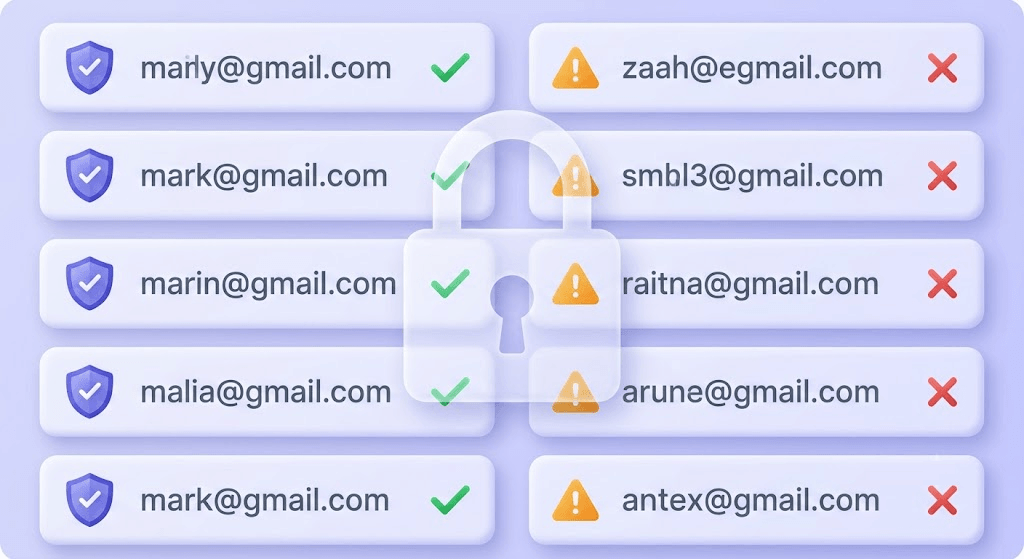
Here's the gap every privacy guide ignores: encryption protects your message content. It does absolutely nothing to protect your domain from bounces, spam complaints, or blacklisting.
A hard bounce from an encrypted send carries exactly the same reputation damage as a hard bounce from a plain-text send. The receiving mail server doesn't grade you on your encryption choices — it grades you on whether your addresses are valid, your complaint rate is low, and your sending patterns look legitimate.
Privacy-focused senders tend to have smaller, more carefully curated lists — which is a natural advantage. But anyone doing bulk encrypted outreach (legal firms, healthcare organizations, financial services companies sending account notices) still faces the same deliverability math as any other sender. Stale addresses bounce. Role addresses (info@, admin@) generate complaints. Catch-all domains — common in privacy-conscious organizations that accept all mail at their domain — look valid until the SMTP handshake reveals the specific mailbox doesn't exist.
Catch-all domains are especially common in privacy-conscious organizations
Many organizations that care about email security also configure catch-all DNS — accepting all mail at the domain level. This means a surface-level MX check will show the domain as valid, but the specific mailbox may not exist. Our 11-stage verification engine probes the mailbox directly and flags catch-alls separately — so you know which addresses are genuinely deliverable before you send.
The right workflow is sequential, not either/or: verify the list first, then encrypt the send. If you're sending PHI or legal documents to a list of external recipients, run those addresses through a verifier before the campaign goes out. Remove the invalids, the disposables, and the catch-alls you can't confirm. Then apply your encryption layer.
This matters more than most senders realize. The email deliverability literature consistently shows that list quality is a stronger predictor of inbox placement than authentication or sending infrastructure. Authentication (SPF, DKIM, DMARC) tells inbox providers who you are. A clean list tells them your mail is worth delivering. Encryption tells them nothing about either.
Check an address before you send sensitive data to it
Paste any email address. Valid Email Checker's 11-stage engine checks syntax, MX, SMTP handshake, mailbox existence, catch-all status, and more — in seconds.
Powered by Valid Email Checker — full SMTP handshake, disposable + role detection, no card required.
If you're working with a larger list — a client contact database, a patient notification list, a legal service roster — bulk verification is the right tool. Upload the list, get a clean segmented result (safe, risky, invalid, catch-all, disposable), and send only to the addresses that will actually deliver. Any address that comes back with an Unknown status gets an automatic credit refund — no support ticket, no fine print.
Free tool · no signup
Verify before you send sensitive data
Check any email address in seconds — syntax, MX, SMTP, catch-all, and 7 more stages. Unknown results refunded automatically.
For senders who want a full picture of where their domain stands before a high-stakes send, run a deliverability check alongside the list verification. It surfaces blacklist hits, authentication gaps, and reputation signals that encryption can't fix — but that a clean list and solid DNS records can.
Free tool · no signup
See how inbox providers score your domain
Blacklist status, authentication check, and reputation signals in one place.
Frequently asked questions about encrypted email
Frequently asked questions
What is the difference between TLS encryption and end-to-end encryption in email?
Can Gmail or Outlook send truly end-to-end encrypted emails?
Which encrypted email service is best for personal use in 2026?
Does encrypting an email protect the subject line and metadata?
How do I send an encrypted email to someone who doesn't use an encrypted provider?
Is Proton Mail actually private, or can the company read my messages?
Does using an encrypted email service affect email deliverability?
What data should always be sent over encrypted email?
Encrypted email solves one specific problem: keeping your message content away from unauthorized eyes. It doesn't solve deliverability, sender reputation, or the risk of sending to addresses that will hard-bounce and damage your domain. The senders who get both right verify their list first, then apply encryption to the send — treating them as two layers of the same professional standard, not competing concerns. Run a sample of your next encrypted send through Valid Email Checker's verifier before it goes out.
Try Valid Email Checker free
Verify any email in under a second
Get 150 free verifications. No credit card. Auto-refund on every Unknown result — the only verifier we know that does this.
- 150 free credits when you sign up
- Auto-refund every Unknown verification (we're the only ones that do)
- 11-stage flow catches what 1-step checkers miss
- Drop-in integrations for Mailchimp, HubSpot, SendGrid, 14 more
Written by
Mara ChenMara covers deliverability from the receiving end — the filters, reputation signals, and quiet rejections that decide whether you reach the inbox or the spam folder. She cares less about clever subject lines than the unglamorous fundamentals that actually move placement: clean lists, consistent sending, and a sender reputation you don't have to rebuild every quarter. Expect practical, no-hype advice grounded in how mailbox providers really behave.