Emailing at scale: list quality and authentication first
 Emmanuel KwartengOctober 28, 2026
Emailing sounds simple — you type something, hit send, and it arrives. That model holds for one message to one person. The moment you're emailing a list of 500, 5,000, or 500,000 addresses, the rules change completely, and most senders don't find out until their open rates crater or their ESP suspends their account.
This guide covers what emailing actually is at each scale, how messages travel from your outbox to someone else's inbox, and — critically — what determines whether they get there at all. By the end, you'll know which metrics matter, why list quality is the lever most senders ignore, and how to check your authentication records in under two minutes.
The one thing most deliverability guides skip: verification and authentication aren't advanced topics you revisit later. They're the foundation everything else sits on.
What emailing actually means (and why the definition matters)
The word emailing does two different jobs, and conflating them is where most beginners get into trouble. As a verb applied to one person — "I'm emailing Sarah" — it means composing and sending a single message. As a discipline, emailing means sending electronic messages at scale to a list of recipients, with measurable outcomes, infrastructure dependencies, and legal obligations attached.
The gap between those two meanings is where sender reputation lives. When you email one person and it bounces, nothing happens to you. When you email 10,000 people and 8% bounce, inbox providers start flagging your domain as a source of bad traffic. The damage compounds across every send you make afterward.
There are three distinct modes of emailing, and each one runs by different rules:
- Personal email — one sender, one recipient, no infrastructure beyond a standard email client. Deliverability is rarely an issue. Metrics don't apply.
- Transactional email — triggered by a user action (purchase receipt, password reset, shipping notification). Low volume per send, but high deliverability expectation. Users are waiting for these messages. A missed transactional email is a support ticket.
- Bulk/marketing email — newsletters, product launches, re-engagement campaigns, cold outreach. Highest volume, highest bounce risk, most sensitive to sender reputation signals.
The mode you're in determines which metrics matter and which mistakes are survivable. A 5% hard-bounce rate on a personal account is invisible. The same rate on a marketing send to 50,000 addresses will get your account flagged within a week. Knowing which mode applies to your sends — and setting up your infrastructure accordingly — is the first decision, not the last.
How an email actually travels from send to inbox
Most senders treat email delivery as a black box: you click send, it either arrives or it doesn't. The path is actually a multi-hop relay, and messages can die at any point along it.
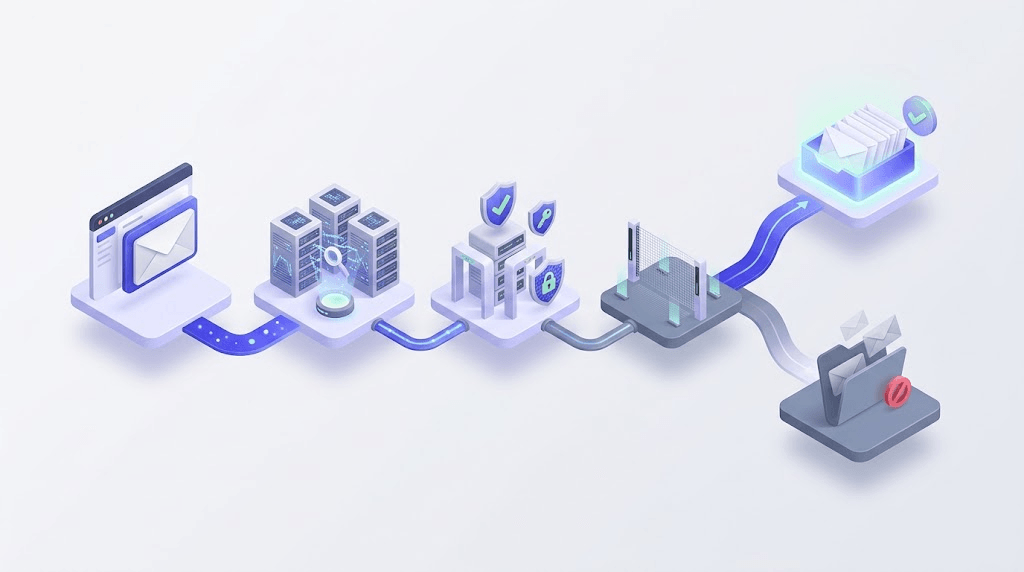
Here's what happens at each hop:
- Mail User Agent (MUA): your email client, ESP dashboard, or application code hands the message to a sending mail server via SMTP — defined in RFC 5321.
- Sending MTA: your mail transfer agent authenticates the send (SPF, DKIM) and opens a TCP connection to the recipient's server.
- DNS lookup: the sending MTA queries DNS for the recipient domain's MX records. No valid MX record means instant failure — the message has nowhere to go.
- Receiving MTA: the recipient's mail server accepts (or rejects) the connection based on your IP reputation, your authentication records, and its own policy.
- Spam/content filter: even after acceptance, the message passes through filters that score it on content, sender history, and engagement signals before placing it in inbox or spam.
Why does the same message reach Gmail but fail on Outlook? Filter differences, not content. Gmail's algorithms weight engagement signals heavily (do recipients click and reply?). Microsoft's filters lean harder on IP reputation and authentication alignment. A sender with a clean IP but a cold domain often clears Gmail first and Outlook weeks later. Understanding this means you stop asking "why is my email going to spam" and start asking "which filter layer is rejecting me" — a much more productive question.
For a deeper look at MX records and what happens when they're missing or misconfigured, the MX Records Explained guide covers the routing logic in detail.
The three types of emailing campaigns — and their different risk profiles
Not all sends carry the same risk. The type of campaign you're running determines how aggressively inbox providers scrutinize your traffic and how much margin you have for error.
Marketing and promotional sends — newsletters, product launches, re-engagement sequences — carry the highest volume and the highest bounce risk. These lists accumulate stale addresses over time. Subscribers who signed up 18 months ago and never opened anything are now engagement dead weight. Every send to them trains filters to treat your domain as low-value.
Transactional sends — order confirmations, password resets, shipping notifications — sit at the opposite end. Volume per message is low, but the deliverability expectation is absolute. A user waiting for a password reset doesn't check their spam folder. When transactional mail fails, the user assumes the product is broken.
Relational and drip campaigns — onboarding sequences, educational email courses, re-engagement flows — sit in the middle. They're scheduled like marketing mail but carry the implicit expectation of a transactional message: the user signed up for this specifically.
Don't mix transactional and marketing sends on the same IP
If your marketing list generates spam complaints and your transactional mail shares the same sending IP, the complaint rate contaminates your transactional deliverability. ESPs like SendGrid and Mailgun separate these internally — dedicated IPs or subdomains for transactional sends are standard practice for this reason.
Mailchimp, Klaviyo, and ActiveCampaign all offer separate sending domains or dedicated IP options for exactly this reason. Use them. The cost of a complaint on your marketing IP hurting a transactional send is far higher than the cost of the infrastructure separation.
The metrics that tell you whether your emailing is working
There are five metrics worth tracking. Two of them inbox providers can see directly and use to score your sender reputation. Three of them you can see in your ESP dashboard but need to interpret carefully.
Open rate is useful for spotting trends — a sudden drop often signals a deliverability problem before your bounce rate confirms it — but unreliable in absolute terms. Since Apple's Mail Privacy Protection (MPP) launched in 2021, a significant share of "opens" are machine-generated prefetches, not human reads. Any open rate benchmark you read from before 2021 is outdated.
Click-to-open rate (CTOR) — clicks divided by opens — is the metric that survived MPP intact. If someone opened (even via prefetch) and then clicked, that's a genuine signal. CTOR is a better proxy for content relevance than raw open rate.
Bounce rate is where things get serious. Hard bounces — permanent delivery failures, usually because the address doesn't exist — are the metric that triggers ESP enforcement. The threshold that matters is 2% hard bounce rate. Most ESPs issue warnings around 2% and begin suppressing accounts at 5%. Google's sender guidelines flag high bounce rates as a signal of poor list hygiene.
Unsubscribe rate and spam complaint rate are the two numbers inbox providers actually watch. Google Postmaster Tools exposes your domain-level spam complaint rate directly. A complaint rate above 0.1% is where Gmail starts filtering your sends. Above 0.3% and you'll see widespread spam folder placement. For a full breakdown of how to reduce these numbers, the email deliverability guide covers the mechanics.
Delivery rate vs. inbox placement rate is the distinction most senders don't make. Delivery rate measures whether the receiving server accepted the message. Inbox placement rate measures whether it landed in the inbox rather than the spam folder. A 99% delivery rate and a 60% inbox placement rate is not a good result — it means 40% of your accepted sends are invisible to recipients.
Free tool · no signup
See where your sends are actually landing
Test inbox placement across Gmail, Outlook, and Yahoo in under 60 seconds.
Why list quality is the leverage point most senders ignore
Most deliverability advice focuses on content — subject lines, image-to-text ratios, link counts. That advice is downstream of the real problem. A dirty list doesn't just hurt one campaign. It degrades your sender reputation over months, making every subsequent send harder to place in the inbox.
Here's the math: 10,000 sends at a 5% hard-bounce rate generates 500 permanent failure signals. Each one tells the receiving network that your domain is sending to addresses that don't exist — a pattern that looks identical to a spammer who bought a list. Inbox providers don't know you acquired those addresses legitimately through a slow-decaying opt-in form from 2021. They see the bounce signal.
Spamtraps enter legitimate lists in three main ways: scraped data that includes honeypot addresses, old opt-ins where the address was later converted to a trap by the receiving domain, and typos at signup (gmial.com, yhaoo.com) that were never real addresses. The last category is especially common on high-volume signup forms without double opt-in.

Role-based addresses — info@, admin@, support@, hello@ — are a separate problem. They're usually shared inboxes monitored by multiple people, which means engagement is low and unsubscribe behavior is unpredictable. One person on a shared inbox who marks your message as spam creates a complaint against your domain even if the person who originally subscribed would have engaged. The disposable email detection guide covers the full taxonomy of addresses that drag down engagement metrics.
The case for verifying before every significant send — not just at list import — is straightforward. Addresses decay. Studies consistently show email list decay rates of 20–25% per year, meaning a list that was clean 12 months ago has shed a quarter of its valid addresses. Verifying at import and never again means you're sending to progressively worse data with each campaign.
Check an address before it bounces
Paste any email address and see the 11-stage verification result in seconds. No card required.
Powered by Valid Email Checker — full SMTP handshake, disposable + role detection, no card required.
Valid Email Checker's 11-stage verification engine checks syntax, MX records, SMTP handshake, mailbox existence, catch-all detection, role detection, disposable detection, spamtrap detection, mailbox-full status, and disabled-account status before returning a result. If both upstream providers return a non-definitive answer, the result is marked unknown and the credit is automatically refunded — no support ticket needed. For a full explanation of what each status means, see the result types guide.
Authentication: the three records every sender must have
Since February 2024, Google and Yahoo require bulk senders — anyone sending more than 5,000 messages per day — to have SPF, DKIM, and DMARC configured. Not configured correctly. Configured. Senders who don't meet the requirement face rejection, not spam-folder placement. The requirement isn't going away; it's the new floor for emailing at scale.
SPF (Sender Policy Framework) is a DNS TXT record that tells receiving servers which IP addresses are authorized to send mail for your domain. One misconfigured include directive — adding a third-party sender whose IP range overlaps with a flagged provider — and you're failing authentication for every send. SPF is defined in RFC 7208. You can check your SPF record in seconds without touching DNS manually.
DKIM (DomainKeys Identified Mail) adds a cryptographic signature to outgoing messages that the receiving server verifies against a public key in your DNS. It proves the message wasn't modified in transit. A missing or broken DKIM record means the receiving server has no way to verify the message is genuinely from you. DKIM is specified in RFC 6376.
DMARC (Domain-based Message Authentication, Reporting, and Conformance) is the policy layer that sits on top of SPF and DKIM. It tells inbox providers what to do when either check fails: none (monitor only), quarantine (send to spam), or reject (block the message). Without a DMARC record, a spoofed email using your domain faces no policy consequence. You can check your DMARC policy and see your current configuration without touching DNS.
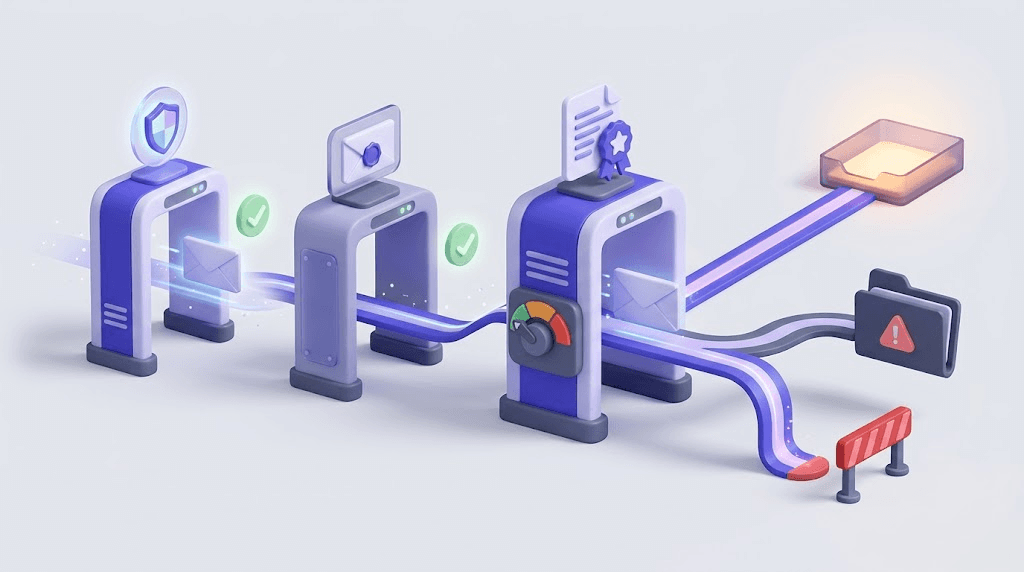
The full interaction between these three records — why they need to be aligned, not just present — is covered in the email authentication guide. For most senders, the fastest path to compliance is running a deliverability check first to see which records are missing or misconfigured.
Best practices that actually move the needle
Most "best practice" lists are recycled from 2018 and assume things that haven't been true since. Here's what actually affects outcomes in 2025.
Send frequency: more sends are not automatically worse. The research on frequency and unsubscribe rate is consistently misread. Irrelevant mail at any frequency kills list health. Relevant mail at high frequency performs fine. The correct question isn't "how often should I email" — it's "how often do I have something worth sending."
Mobile-first design: over 60% of email opens happen on mobile. A single-column layout with 16px body text and a tap target of at least 44px outperforms multi-column designs on small screens in almost every A/B test. Design for the smaller screen first.
A/B testing subject lines before full send is the tactic with the most reliable, repeatable lift. Send to 20% of your list with two subject lines, wait four hours, then send the winner to the remaining 80%. Most ESPs automate this. Almost nobody does it consistently.
Plain-text fallback: a well-written plain-text version improves deliverability, not just accessibility. Some spam filters score HTML-only messages more harshly. More importantly, a plain-text version forces you to write a version of your message that works without design crutches — and those usually perform better in the inbox anyway.
Sunset policies are the practice most senders delay until they're already in trouble. Remove subscribers who haven't opened or clicked in six months before they become complaints. A segment that's been dormant for six months has a complaint rate 3-4x higher than your active segment. The email list hygiene framework covers how to build a sunset flow that doesn't accidentally remove engaged subscribers.
Common emailing mistakes and how to fix them
Sending to a purchased list
Purchased lists are full of spamtraps, role addresses, and addresses that were last verified years ago. The bounce rate alone will trigger ESP warnings within the first campaign. The spam complaint rate — from people who never agreed to hear from you — compounds the damage. There is no ROI case for a purchased list that survives contact with real deliverability data.
Skipping double opt-in
Single opt-in lists have higher complaint rates and lower engagement across every study that's measured both. More practically: without a confirmed opt-in record, you have no recourse when a recipient reports you to their ISP and claims they never subscribed. Double opt-in is evidence. Single opt-in is your word against theirs.
Ignoring bounce notifications
Most ESPs auto-suppress an address after one hard bounce. But if you export that list and re-import it to a different ESP, the suppression doesn't travel with it. Senders who switch ESPs and import unclean lists restart the reputation damage cycle from scratch. Verify before every significant re-import — not just the first time.
No unsubscribe link or a broken one
A missing or non-functional unsubscribe link is a CAN-SPAM violation. It's also a deliverability disaster: recipients who can't unsubscribe click "Report Spam" instead. That complaint goes directly to inbox providers and counts against your sender reputation. One-click unsubscribe — required by Google's 2024 sender guidelines — needs to work on every send, not just the ones you remember to test.
Blasting the full list when a segment would do
Sending a product update relevant to 15% of your list to 100% of it trains inbox providers to treat your sends as low-engagement traffic. Volume without relevance is the fastest way to degrade your sender reputation. Segment by behavior (last purchase, last click, product category) before sending. The why emails go to spam guide covers how filter algorithms penalize low-engagement sends.
Choosing an emailing tool for your use case
The right tool depends on what you're sending, to whom, and how technically comfortable you are with setup. Here's the honest breakdown:
| Use case | Recommended tool | Why |
|---|---|---|
| Small list under 5K, newsletters | Mailchimp or MailerLite | Lowest friction, built-in templates, generous free tiers |
| E-commerce behavioral email | Klaviyo | Revenue attribution, behavioral triggers, Shopify/WooCommerce native |
| Cold outreach | Dedicated outreach tool (not an ESP) | Per-inbox sending limits, warm-up built in — ESP tools aren't designed for this |
| Transactional (receipts, resets) | SendGrid or Mailgun | API-first, not campaign-first; purpose-built for triggered sends |
| Mid-market marketing + CRM | HubSpot or ActiveCampaign | CRM integration, lifecycle automation, segmentation depth |
The one thing every tool choice has in common: they all assume your list is clean. None of them verify addresses for you before sending. That step is yours to own, and it belongs before the campaign goes out — not after the bounce report arrives.
For cold outreach specifically, the stakes are higher. The cold email list verification guide covers why a 2% hard-bounce threshold is especially unforgiving on cold-send infrastructure, where you're starting with no sender history to absorb early mistakes.
Free tool · no signup
Verify your list before your next send
11-stage verification. Auto-refund on Unknown results. Start with 150 free credits — no card required.
Frequently asked questions about emailing
Frequently asked questions
What is emailing and how is it different from regular email?
What is a good bounce rate for an emailing campaign?
Do I need SPF, DKIM, and DMARC to send marketing emails?
How often should I email my list without hurting deliverability?
What happens if my hard bounce rate goes above 2%?
How do spamtraps end up on a legitimate email list?
What is the difference between delivery rate and inbox placement rate?
Should I verify my email list before every send or just once?
Emailing at scale is infrastructure work disguised as marketing work. The senders who sustain strong inbox placement share one habit: they treat list quality and authentication as the foundation, not the finishing touch. Run your next list through a verifier before it goes out — Valid Email Checker's 11-stage engine flags the addresses that would cost you the most, and auto-refunds the credits on any result it can't definitively classify.
Try Valid Email Checker free
Verify any email in under a second
Get 150 free verifications. No credit card. Auto-refund on every Unknown result — the only verifier we know that does this.
- 150 free credits when you sign up
- Auto-refund every Unknown verification (we're the only ones that do)
- 11-stage flow catches what 1-step checkers miss
- Drop-in integrations for Mailchimp, HubSpot, SendGrid, 14 more
Written by
Emmanuel KwartengEmmanuel is the founder of Valid Email Checker. He spends most of his time in bounce logs, verification data, and the gap between what email vendors promise and what actually happens when you hit send. He started the company because too much deliverability advice is guesswork dressed up as best practice, and he writes here to cut through it with the numbers behind each claim.