
Cancelling your subscription: grace period and reactivation
Cancelling stops future charges. You keep full access until the current billing period ends — no immediate cutoff, no penalty fee. This page walks through the cancel flow, what happens during the grace period, and how to reactivate if you change your mind.
How cancellation works
- Cancel anytime, no fees, no penalties.
- Full access until period end — you paid for the cycle, you keep the cycle.
- Credits stay available through the grace period.
- No further charges — the card is not billed again.
- Reactivate anytime before the period ends.
How to cancel
- Open Account Settings in the sidebar.
- Select Billing & Payments.
- Click Cancel Subscription.
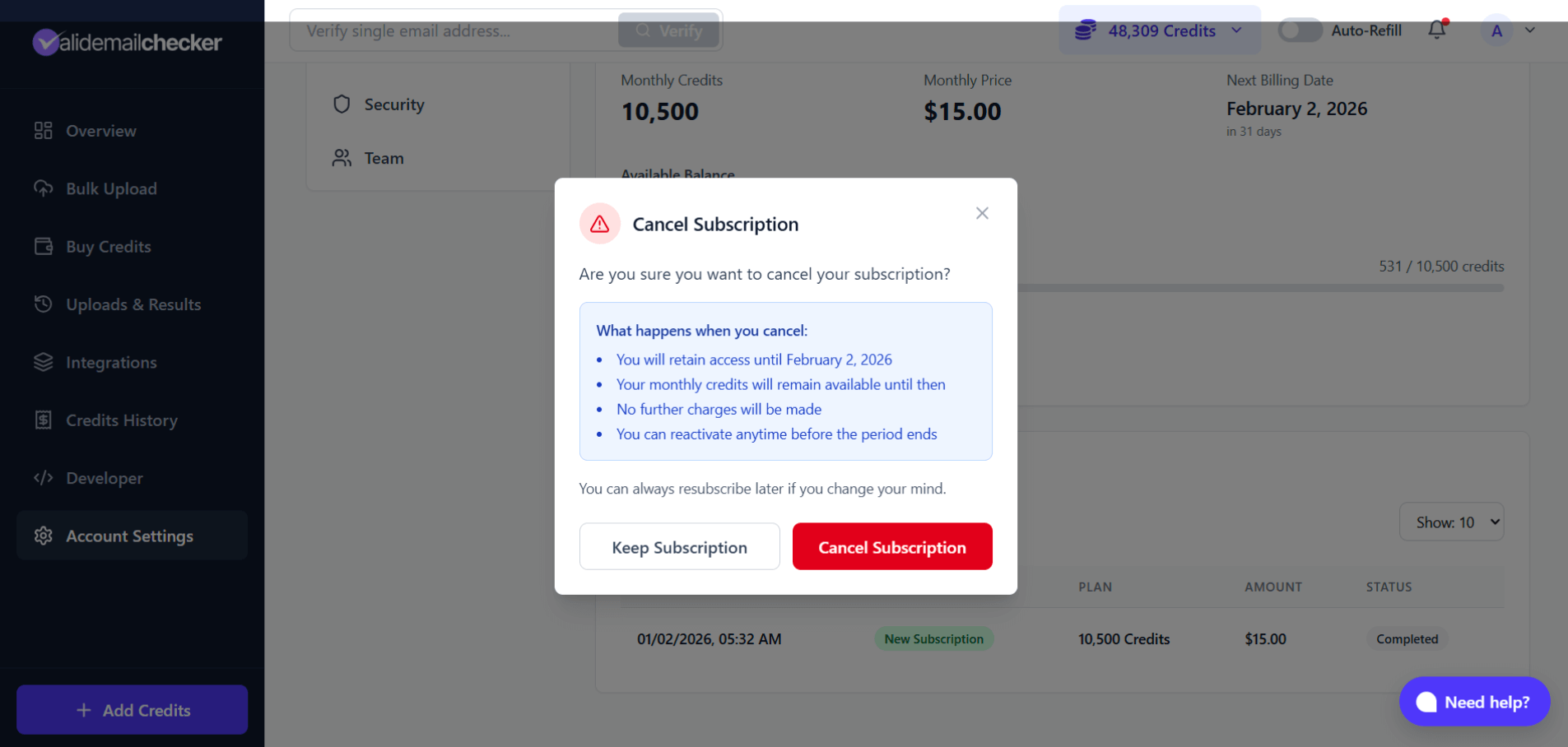
The modal explains:
- When your access ends (your next billing date).
- Your credits remain available until that date.
- No further charges will be made.
- You can reactivate anytime before the period ends.
- Click Cancel Subscription to confirm.
What happens after cancellation
Immediately
- Subscription status changes to Ending Soon.
- Grace period begins, ending at your next billing date.
- Any scheduled downgrade is cancelled (no longer relevant once you are cancelling outright).
- No charge is made.
During the grace period
- Full access to all features.
- Monthly credits stay available.
- PAYG credits stay available (and continue to never expire).
- You can verify emails, use the API, run integrations — same as before.
- You can reactivate at any point.
When the grace period ends
- Subscription status becomes Expired.
- Monthly credits expire — bucket goes to zero.
- No renewal charge.
- PAYG credits remain — they are never affected by subscription state.
What happens to your credits
| Bucket | During grace period | After expiration |
|---|---|---|
| Monthly | Available | Expires |
| PAYG | Available | Keep forever |
PAYG credits never expire, ever. Cancelling the subscription has zero effect on them.
The grace period in practice
The grace period is the gap between when you cancel and when the subscription actually expires.
Use the grace period — verify what you can, download anything you need, decide if cancellation is still the right call.
Reactivating your subscription
Changed your mind during the grace period? Reactivate from the same Billing page:
- Open Account Settings → Billing & Payments.
- Click Reactivate Subscription.
- Confirm reactivation.
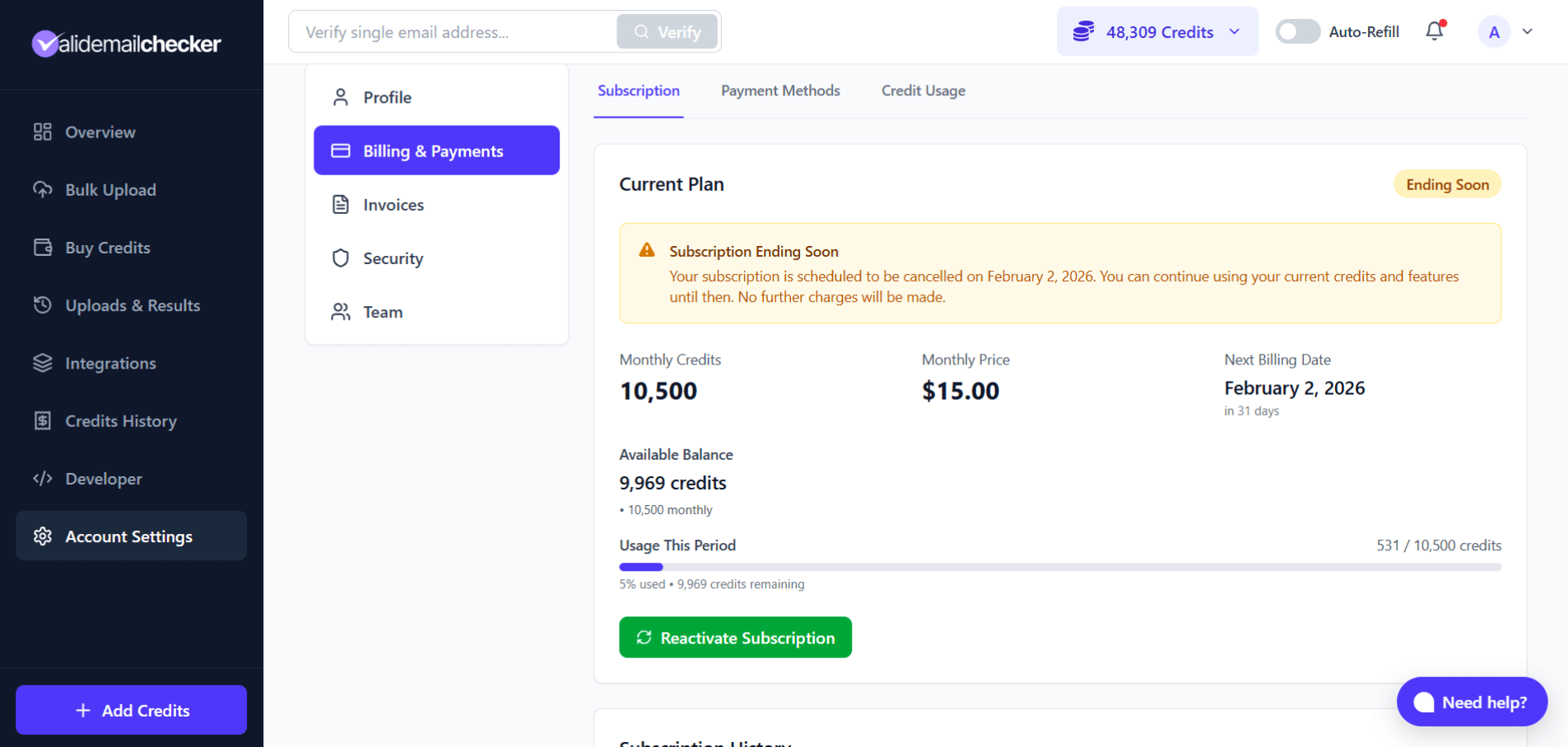
The subscription continues as if you never cancelled: same plan, same billing date, same credits, normal renewal at period end.
After the grace period ends
Once the subscription is in Expired state, you cannot reactivate — you start a new subscription instead. PAYG credits remain in your account, but the Monthly bucket starts fresh from the new plan.
Cancel vs. downgrade
| Cancel | Downgrade |
|---|---|
| Stop the subscription entirely | Keep the subscription at a smaller size |
| No more Monthly credits after period end | Smaller Monthly allocation each cycle |
| No more recurring charges | Lower recurring charge |
| Keep PAYG credits only | Keep both Monthly (smaller) and PAYG |
Cancel if you no longer need a recurring credit allocation. Downgrade if you still need credits regularly but fewer of them — see downgrade your subscription.
Before you cancel
Use your Monthly credits
They expire at the end of the grace period. Verify what you can before then.
Download any results you need
Verification result files have their own 15-day retention. Download anything you might want long-term before that clock runs out.
Consider alternatives
- [Downgrade](downgrade-your-subscription-guide) — keep a smaller subscription if you still need recurring credits.
- Pause usage — just stop verifying. PAYG credits never expire, so they'll be there when you come back.
- Switch to PAYG only — cancel the subscription, top up with PAYG packs as needed.
Common questions
Will I be charged when I cancel?
No. Cancellation is free. The current cycle is already paid; no further charges.
Can I get a refund for unused time?
No partial refunds, but you don't lose any time either — you keep access through the end of the period you already paid for.
What if I cancel by mistake?
Reactivate during the grace period. One click on the subscription page.
Can I cancel and immediately subscribe to a different plan?
Yes, but the cleaner path is to downgrade or upgrade directly. Cancel + resubscribe starts a fresh subscription rather than continuing the existing one.
Will I lose my verification history?
No. Your account, upload history, and results are unaffected by cancellation. Only the Monthly credit bucket expires when the grace period ends.
What happens to my team members?
When the subscription expires, team members lose access to the shared Monthly credits. PAYG credits in the account still work — but if the only credit source was the subscription, they won't be able to verify until you top up or resubscribe.
Can I cancel during the free signup credits?
There is nothing to cancel. The 150 free credits are PAYG and do not come with a subscription. You only have a subscription if you bought a monthly plan.
After cancellation
- Your account stays active. Log in anytime, even after the grace period.
- PAYG credits remain available.
- Verification history is preserved.
- You can resubscribe anytime — start a fresh subscription whenever you want.
Cancellation does not delete the account. If you want full deletion instead, see delete your account.
Quick reference
| Question | Answer |
|---|---|
| When does cancellation take effect? | End of current billing period |
| Lose access immediately? | No — grace period until period ends |
| Cancellation fee? | None |
| Can I reactivate? | Yes, during grace period (one click) |
| What credits do I keep? | PAYG (after expiration). Monthly expires. |
| Can I resubscribe later? | Yes, anytime |
Next steps
Related questions
Still stuck? Email support