
Invoices and receipts: download, manage, and use your credits history
Every purchase you make generates an invoice automatically — no need to ask support for one, no waiting period. This page walks through where to find invoices, how to add company details, and how to use the credits-history view for usage tracking.
Where to find your invoices
- Click Account Settings in the sidebar.
- Open the Invoices section under Billing & Payments.
- Switch between Invoice History and Invoice Settings with the tabs at the top.
Invoice History
Every past invoice lives in one searchable list.
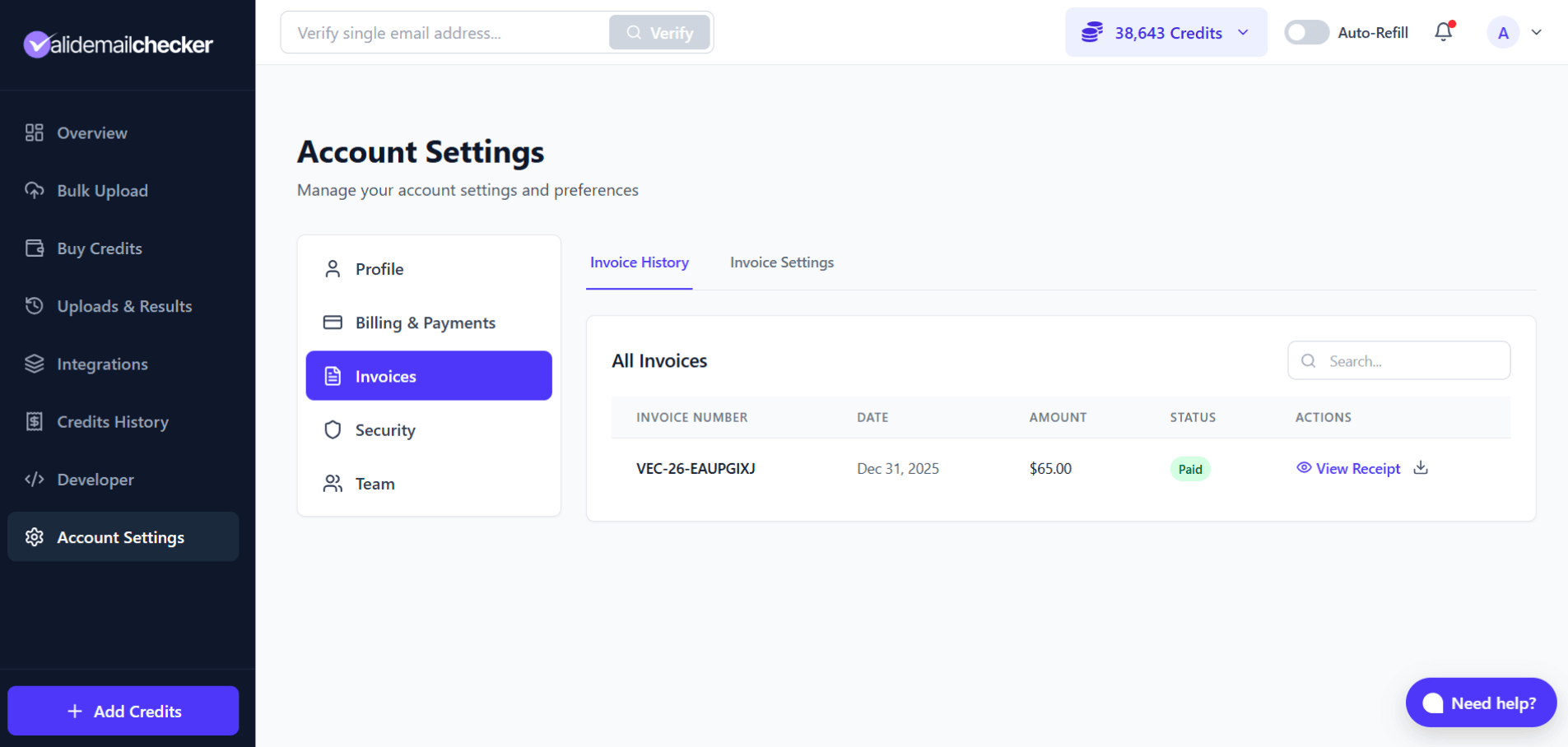
Each row shows:
| Column | What it shows |
|---|---|
| Invoice Number | Unique reference (format: VEC-25-XXXXXXXX) |
| Date | When the invoice was generated |
| Amount | Total charged in USD |
| Status | Usually "Paid"; "Pending" for crypto payments still confirming on-chain |
| Actions | View receipt or download PDF |
Viewing a receipt
Click View Receipt on any row to see the full breakdown:
- Credits purchased (base plus bonus).
- Payment method used.
- Transaction reference.
- Your current billing information (as it stands today — see below).
Downloading PDFs
Click the download icon on any invoice to save a PDF copy. The PDF is formatted for accounting, expense-tracking, and tax filing.
Invoice Settings: adding your business details
Add your company name, tax ID, and address so they show up on downloaded invoices.
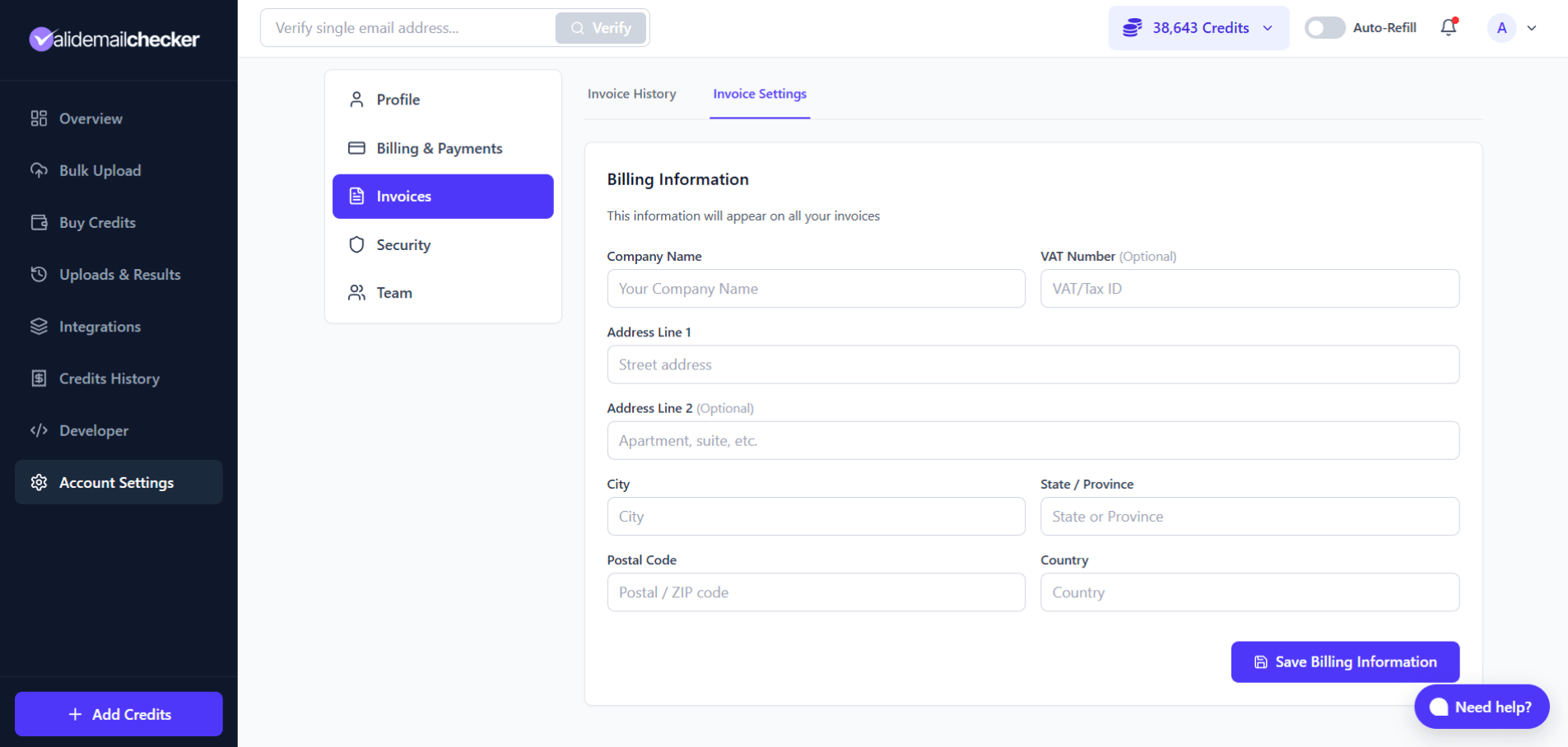
| Field | What it is for |
|---|---|
| Company Name | Your business name |
| VAT Number | Tax ID for business purchases (EU VAT, etc.) |
| Address Line 1 | Street address |
| Address Line 2 | Suite / unit / floor (optional) |
| City | City name |
| State / Province | State or region |
| Postal Code | ZIP or postal code |
| Country | Country name |
Every field is optional. Fill in what your accounting team needs.
How updates flow to old invoices
Save your billing info, then re-download any past invoice. The PDF picks up your current details — so if you change your company name later, you can re-download old invoices with the new name. Useful when accounting needs old invoices reformatted.
Credits History: every credit movement
Where invoices document every dollar that moved, credits history documents every credit that moved — purchases, usage, refunds, signup bonuses, all of it.
Getting there
Click Credits History in the sidebar.
Transaction types you might see
| Transaction type | What it means |
|---|---|
| Credits Purchase | One-time PAYG credit purchase |
| Monthly Subscription | New subscription started |
| Subscription Renewal | Monthly credits refreshed at the start of a billing cycle |
| Bulk Verification | Credits spent on a list verification |
| API Verification | Credits spent via the API |
| Single Verification | Credit spent on a one-off check from the dashboard |
| Welcome Bonus | Free credits awarded at signup (+150) |
| Refund | Credits returned for unprocessed or Unknown emails |
| Auto Refill | Automatic credit purchase triggered by your auto-refill settings |
| Account Credit | Credits added manually by the support team (rare) |
Reading the log
- Green (+) — credits added (purchases, refunds, bonuses).
- Red (−) — credits used (verifications).
- Balance — running total after each transaction.
- Details — short description of what happened.
Filtering
Narrow the view down with three filters:
- Transaction type — show only purchases, only verifications, only refunds, and so on.
- Time period — today, last 7 days, last 30 days, or a custom range.
- Search — find a row by list name or description.
Invoices vs. Credits History — when to use which
| Use Invoices for… | Use Credits History for… |
|---|---|
| Tax records | Usage tracking |
| Expense reports | Finding a specific verification job |
| Reimbursement claims | Checking that refunds landed |
| PDF documentation for accounting | Monitoring your balance over time |
Common questions
Where is my invoice?
Account Settings → Invoices → Invoice History. Every payment auto-generates an invoice.
Can I update billing info on old invoices?
Yes. Update your details in Invoice Settings, then re-download any invoice. The PDF picks up your current information.
How long are invoices stored?
Indefinitely. Every invoice from your account history stays available to view and download for as long as your account exists.
My crypto payment went through but I do not see the invoice yet.
Crypto payments take a few minutes to confirm on-chain. The invoice appears once the payment is verified. If it has been longer than 30 minutes, contact support.
Next steps
Related questions
Still stuck? Email support