How Email Validators Work: The 11-Stage Pipeline
 Emmanuel KwartengJuly 5, 2026
Your list has 15,000 addresses. You've written the campaign. You're ready to send. What you don't know is that roughly 2,000 of those addresses will bounce, 300 belong to disposable inboxes, and at least a handful are spamtraps — addresses specifically designed to flag senders who don't clean their lists.
An email validator is the tool that finds all of that before you hit send. Not by sending a test email. Not by guessing. By running every address through a series of checks — syntax, DNS, SMTP handshake, mailbox probe, and more — and returning a status you can act on.
This post explains exactly how that pipeline works, what each of the 10 possible statuses means, and what to do with every one of them. By the end, you'll have a decision tree your whole team can use — no documentation required.
What an email validator actually does
The plain definition: an email validator is software that checks whether an address exists and can receive mail, without sending anything to it.
That last part matters. Sending a test message to verify an address is both impractical and counterproductive — it generates bounces, burns sender reputation, and alerts the recipient. Real validation happens at the protocol level, through a series of checks that mimic what a mail server would do without actually delivering anything.
There's a distinction worth making here: validation and verification are not the same thing. Validation typically refers to syntax and DNS checks — confirming the address is formatted correctly and that the domain has a mail server. Verification goes further, adding an SMTP handshake and a mailbox-existence probe to confirm the specific inbox responds. Most tools that call themselves "validators" actually do both, but some stop at DNS. That gap is where dead mailboxes slip through.
A syntactically valid address like john.doe@legit-company.com passes a basic format check every time. But if john left the company two years ago and his inbox was disabled, that address is a guaranteed hard bounce. Only a full SMTP probe catches it. This is why the multi-stage pipeline exists — and why skipping later stages leaves dangerous addresses in your list.
The 11 checks that happen when you validate an email
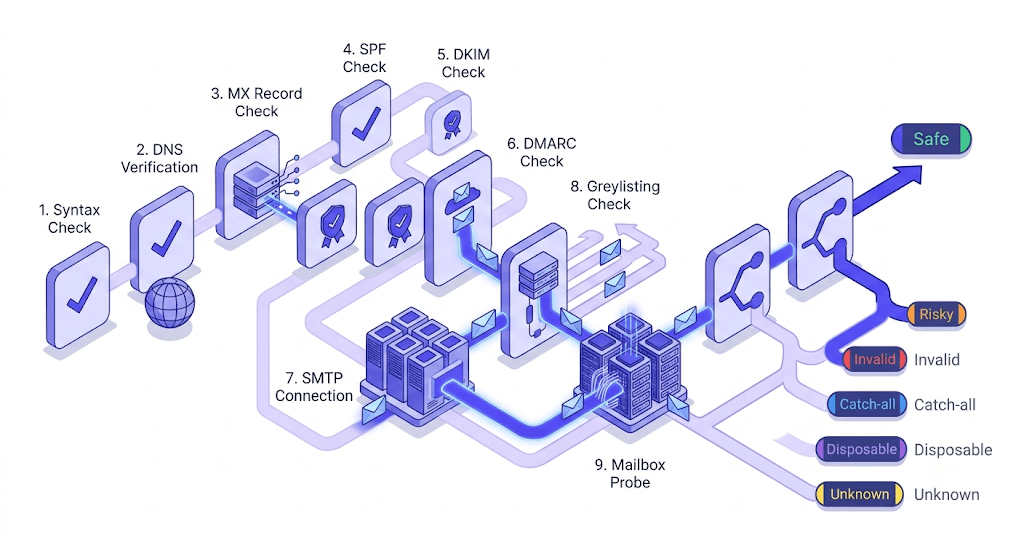
Most validators present a single result. What happens behind that result is a sequential pipeline — each stage gatekeeping the next. Here's how it runs.
Syntax check
The address is tested against the format rules in RFC 5321 and RFC 5322. Local part,
@symbol, domain — all must be present and correctly structured. This is the cheapest check and catches obvious garbage (user@@domain,nodomain,user@). It does not catch anything that looks valid but isn't real.MX record lookup
The validator queries DNS for MX records on the domain. No MX records means no mail server — the domain can't receive email regardless of what the address says. This eliminates domains that exist as websites but have no mail infrastructure.
SMTP handshake
The validator opens a connection to the domain's mail server and initiates the SMTP conversation — without sending a message. If the server refuses connections or returns a permanent error, the address is unreachable.
Mailbox-existence probe
The validator sends a
RCPT TOcommand for the specific address. The server responds with a 250 (accepted), 550 (no such user), or something in between. This is the stage that distinguishes a real inbox from a well-formatted but nonexistent address.Catch-all detection
Some servers accept every
RCPT TOregardless of whether the mailbox exists — this is a catch-all configuration. The validator probes with a known-fake address to test for this behavior. If the server accepts the fake address, the specific mailbox can't be confirmed individually.Role address detection
Addresses like
info@,admin@,support@, andhello@are flagged as role-based. These typically land in shared inboxes managed by teams, not individual recipients. Engagement rates are low; unsubscribe and complaint rates are higher.Disposable domain check
The domain is cross-referenced against a continuously updated list of disposable email providers — services that issue temporary addresses that expire in minutes or hours. These are almost always worth suppressing from any list.
Spamtrap detection
Known spamtrap addresses are flagged. Spamtraps are real addresses maintained by inbox providers and anti-spam organizations specifically to identify senders with poor list hygiene. A single spamtrap hit can trigger a blacklisting.
Inbox-full detection
The server signals that the mailbox exists but is over quota and can't accept new mail. This is a soft, temporary condition — the address is real, but delivery will fail until the user clears space.
Disabled-account detection
The server signals that the account has been permanently disabled by the provider — typically when a user leaves an organization or closes an account. Unlike inbox-full, this is not recoverable.
Final classification
All signals from the previous stages are weighted and combined into a single status. This is the output your campaign tool, CRM, or suppression logic acts on.
Any validator that stops before stage 5 is missing catch-all behavior. Any that stops before stage 8 is missing spamtraps. A pipeline with fewer than 8 stages is leaving measurable risk in your list. The full technical walkthrough lives in our 11-step verification engine guide.
The 10 statuses a validator should return (and what to do with each)
A single yes/no output is not enough. The action you take on a catch_all address is different from the action on a disabled one, and both are different from spamtrap. Here's what each status means and the right response to each. For the full deep-dive, see The 10 Email Verification Statuses Explained.
- Safe — Real mailbox, will accept mail. Send freely.
- Risky — Real mailbox with elevated bounce probability (low-engagement domain, recent migration, unusual server behavior). Send with caution; exclude from cold outreach.
- Invalid — Syntax, MX, or SMTP rejected the address. Guaranteed hard bounce. Remove immediately — no exceptions.
- Unknown — Both verification attempts returned a non-definitive answer. The address might exist or might not. A validator that charges you for this result is taking your money for nothing; the only fair policy is an automatic credit refund.
- Catch-all — The domain accepts all mail regardless of whether the mailbox exists. Suppress from cold outreach; keep for warm audiences where you have engagement history.
- Disposable — Burner address from a temporary email provider. Almost always worth suppressing unless you're running a use-case where temporary access is acceptable.
- Role — Shared inbox (info@, admin@, support@, hello@). Suppress from mass marketing sends; keep for direct B2B transactional mail where the role address is the correct contact.
- Spamtrap — Remove on sight. One hit can trigger a blacklisting. Don't retry, don't segment — remove.
- Disabled — Account permanently closed by the provider. Remove; this address will never be deliverable again.
- Inbox full — Temporarily over quota. The address is real — retry in 7–14 days before making a permanent suppress decision.
Unknown results and your credits
If a validator can't return a definitive answer, charging you for the attempt is indefensible. Valid Email Checker automatically refunds every Unknown result — no support ticket, no fine print. The refund posts to your Credits History immediately. Most competitors don't do this; check before you commit to a plan.
Why bounce rate is the number that ties everything together
Inbox providers — Gmail, Outlook, Yahoo — use bounce rate as one of their primary sender-reputation signals. Cross it above roughly 2% and deliverability starts degrading. Your messages get routed to spam folders, or not delivered at all, before your next campaign even launches.
The compounding effect is what makes this dangerous. One bad campaign raises your bounce rate. A higher bounce rate suppresses future campaigns — inbox providers throttle or filter your sends. Throttled sends produce lower open rates. Lower open rates are another reputation signal. The cycle feeds itself.
Here's a concrete example. You send to 10,000 addresses. 2,300 bounce — a 23% bounce rate. Over the next 30 days, Gmail's Postmaster Tools will show your IP's domain reputation dropping from High to Medium or Low. Google's sender guidelines explicitly flag bulk senders at this level for filtering. Recovering from a Low reputation takes weeks of careful, low-volume sending — not days.
Hard bounces (Invalid, Disabled) and soft bounces (Inbox Full) require different responses. Hard bounces should be permanently suppressed — there is no scenario where resending to an Invalid address produces a different outcome. Soft bounces from inbox-full addresses are worth a retry after 7–14 days. The distinction matters because treating all bounces as permanent inflates your suppression list unnecessarily, while treating all bounces as temporary keeps bad addresses in circulation.
Validating before you send breaks the cycle at the source. The full framework for keeping bounce rate below 2% is covered in our guide on how to reduce email bounce rate below 2%.
Test an address before your next send
Paste any email address and see the full 11-stage result in seconds — no account required.
Powered by Valid Email Checker — full SMTP handshake, disposable + role detection, no card required.
Single-address validation vs. bulk list cleaning — when to use each
These are two different workflows with different triggers.
Single-address validation happens in real time, at the point of capture. A user types their email into a signup form; the validator checks it via API before the form submits. The response is sub-second. Bad addresses never enter your list in the first place. This is the most cost-effective place to validate — one credit per address, one time, at the moment it matters most.
Bulk list cleaning is for the addresses you already have — imported lists, CRM contacts, ESP audiences that have been accumulating for months or years. You upload the list, the job runs asynchronously (queue-and-poll), and you download the results when it's done. For large lists this is not a limitation — it's the correct architecture. Trying to run 200,000 addresses synchronously would time out every HTTP client in existence.
The rule of thumb: validate at capture, clean in bulk before every major send. If you're running campaigns on a list older than 90 days without a cleaning run in between, you're sending to decay — email lists lose roughly 20–25% of their valid addresses per year through job changes, domain shutdowns, and account closures.
When budget is limited and you can't clean the whole list at once, prioritize by last-engagement date. Addresses that haven't opened or clicked in 180+ days are the highest-risk segment. Clean those first. The full walkthrough for bulk jobs is in our bulk verification guide.
How to read a validation result without second-guessing it
Most teams overthink this. The decision tree is simpler than it looks.
Send: Safe, Risky (warm audiences only). Suppress immediately: Invalid, Spamtrap, Disabled. Retry in 7–14 days: Inbox Full. Context-dependent: Catch-all, Role, Unknown.
Catch-all addresses are the most debated. The domain accepts everything, so you can't confirm the specific mailbox. For cold outreach — where you have no prior relationship and no engagement data — suppress them. The bounce risk is unquantifiable. For warm audiences where the address has opened or clicked before, the prior engagement is stronger evidence than the catch-all flag. Keep it. For a complete treatment, see our catch-all emails guide.
Role addresses follow a similar logic. info@company.com on a mass marketing list is almost certainly wasted — shared inboxes managed by a team rarely generate meaningful engagement, and complaint rates are higher because no single person owns the inbox. But billing@company.com on a transactional send for an invoice is correct — that's exactly who should receive it. The question is whether the address is the right contact for this specific message.
Unknown results mean neither of the two verification attempts returned a definitive answer. The address might exist; it might not. The technical reasons include servers that return ambiguous SMTP codes, rate-limiting that prevents a full probe, and configurations that deliberately obscure mailbox existence. The right response is to not send to Unknown addresses from cold lists, and to not pay for the result. Our refund policy handles the latter automatically.
Integrating an email validator into your existing stack
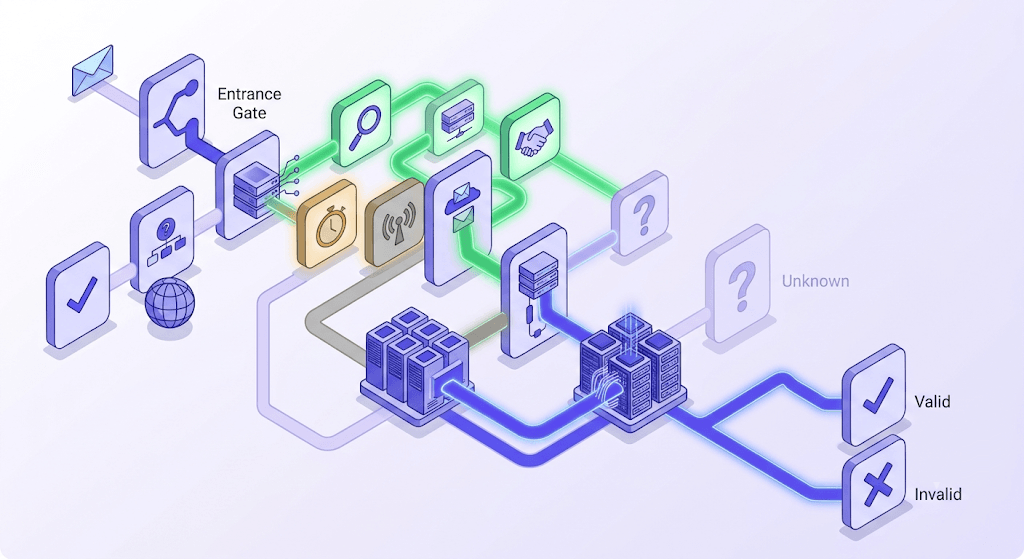
There are three integration patterns, and the right one depends on where in your workflow the addresses enter.
API integration is for real-time validation at signup. One POST to the single verification endpoint, sub-second response, decision made before the user leaves the page. The API uses Bearer token auth and returns the full status plus sub-scores. Full documentation is at our API overview and single verification endpoint pages. If you're building this for the first time, the quick start guide gets you to a working integration in under five minutes.
ESP one-click sync is for cleaning existing audiences directly. Connect your ESP, select the list, run the job, and the cleaned list lands back in the same audience — invalid addresses removed, results logged. Valid Email Checker connects directly to 17 ESPs including Mailchimp, HubSpot, Klaviyo, SendGrid, and ConvertKit. The integrations overview covers all 17.
Scheduled bulk runs are for ongoing CRM hygiene. Rather than one-time fixes, schedule a bulk verification run every 60–90 days against your full active contacts. The list decays continuously; the cleaning cadence should match. After each run, you'll have three segments to handle: safe (keep), invalid/spamtrap/disabled (permanent suppress), and the context-dependent statuses (catch-all, role, unknown) for manual review or rule-based automation.
Free tool · no signup
Full SMTP verification — 11 stages, instant result
Paste a single address or upload a list. Unknown results are refunded automatically.
What to look for when choosing an email validator
The market is full of tools that call themselves validators while running three or four checks and calling it done. Here's how to tell the difference.
Number of verification stages. Anything under 8 is missing meaningful risk categories. Spamtrap detection, catch-all identification, and disabled-account detection each require dedicated stages. A tool that skips them will pass those addresses as valid.
How Unknown results are handled. This is the single most revealing question you can ask a vendor. If they charge for Unknown results, they're billing you for a non-answer. The only defensible policy is an automatic credit refund — which is what Valid Email Checker does, on every Unknown result, without a support ticket. Most competitors don't. This is worth verifying before you buy.
Catch-all handling. Does the tool attempt secondary signals — domain age, engagement proxies, sending history — or does it just label the address catch_all and move on? The latter is honest but limited. Better tools surface additional context.
Accuracy claims. Any vendor claiming 99.5%+ accuracy without publishing a methodology, test dataset, and measurement protocol is overstating. There is no industry-standard accuracy benchmark for email verification. We don't publish a number either — because the honest answer is that accuracy varies by domain type, industry, and list age. Be skeptical of vendors who claim otherwise.
Pricing model. Pay-as-you-go credits work well for irregular sending schedules — you buy what you need, credits don't expire on a monthly reset. Subscriptions work better for teams with consistent monthly volume. Most tools offer both; the right choice depends on your send cadence, not the vendor's default. Checkout our pricing here.
Free tier. Any validator worth evaluating should let you verify a real sample before you commit. Valid Email Checker gives new accounts 150 free credits — enough to run a meaningful test on a cold list segment and see the full breakdown. No card required to start.
| Feature | Minimum acceptable | What Valid Email Checker does |
|---|---|---|
| Verification stages | 8+ | 11 stages across two providers in failover |
| Unknown result handling | Refund the credit | Automatic refund, no ticket required |
| Catch-all detection | Label + flag | Dedicated stage with secondary probe |
| Spamtrap detection | Must have | Dedicated stage |
| Disposable domain check | Must have | 207,219 domains, refreshed weekly |
| Free tier | Enough to test | 150 credits, no card required |
| ESP integrations | Major ESPs | 20 ESPs, one-click OAuth or API key |
| Accuracy claims | Honest (no inflated %) | 99.5% accuracy |
For a deeper comparison of what free tiers actually include — and what most validators hide in the fine print — see our post on what you actually get from a free email verifier.
Free tool · no signup
Check a single email address right now
Real-time result. No account needed for the first check.
Bounce rate is the metric that warns you your list is degrading. Validation is what stops the degradation before it starts. Run a sample of your next campaign through a full 11-stage verifier, read the status breakdown, and you'll know exactly which segment is putting your sender reputation at risk — and what to do about it.
Frequently asked questions
What is the difference between email validation and email verification?
How does an email validator check if an address exists without sending an email?
What should I do with catch-all email addresses?
Why does my email validator return 'Unknown' for some addresses?
How often should I clean my email list?
What bounce rate is considered dangerous for sender reputation?
Can I validate emails in real time at a signup form?
Are role-based email addresses (info@, support@) worth keeping on a marketing list?
Try Valid Email Checker free
Verify any email in under a second
Get 150 free verifications. No credit card. Auto-refund on every Unknown result — the only verifier we know that does this.
- 150 free credits when you sign up
- Auto-refund every Unknown verification (we're the only ones that do)
- 11-stage flow catches what 1-step checkers miss
- Drop-in integrations for Mailchimp, HubSpot, SendGrid, 14 more
Written by
Emmanuel KwartengEmmanuel is the founder of Valid Email Checker. He spends most of his time in bounce logs, verification data, and the gap between what email vendors promise and what actually happens when you hit send. He started the company because too much deliverability advice is guesswork dressed up as best practice, and he writes here to cut through it with the numbers behind each claim.