
What action options does Valid Email Checker offer for Klaviyo? (Keep / Unsubscribe / Delete)
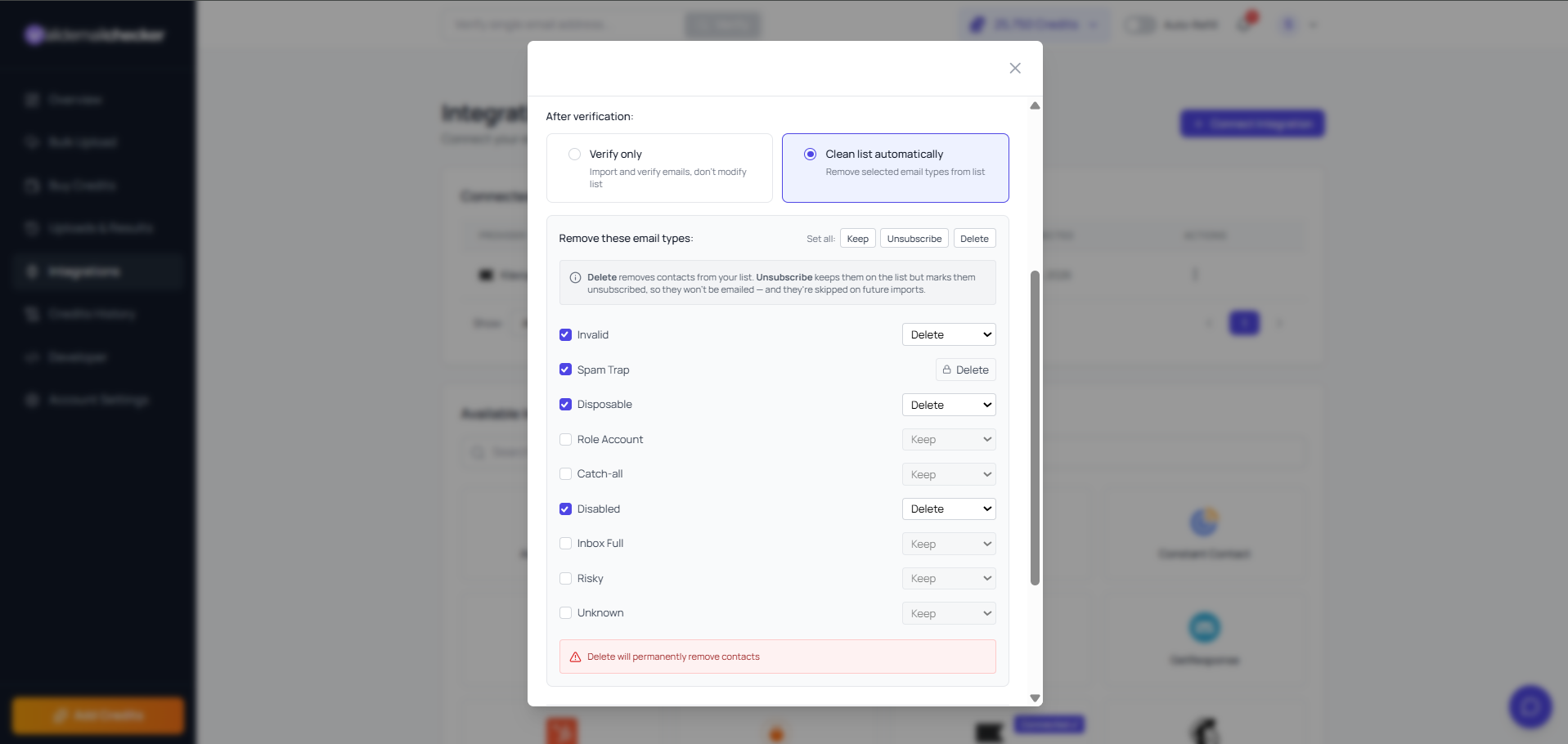
When you pick a Klaviyo list and switch the Valid Email Checker modal to Clean List Automatically, three actions become available per result category. The dropdown labels read Keep, Unsubscribe, and Delete. The category rows cover every result type (Invalid, Spam Trap, Disposable, Role Account, Catch-all, Disabled, Inbox Full, Risky, and Unknown). What changes is how each action lands inside Klaviyo.
How each action behaves in Klaviyo
- Keep — VEC writes nothing back. The profile stays exactly as Klaviyo had it. Properties, event history, list memberships, and segment membership are untouched.
- Unsubscribe — VEC suppresses the profile in Klaviyo so it can no longer receive email marketing. The profile stays on the list with every property and event preserved; it simply stops being emailed, and VEC skips it on future imports of this list.
- Delete — VEC removes the profile from the selected Klaviyo list (a list-membership removal). The profile itself is not deleted from your Klaviyo account — its properties, events, and other list memberships stay intact. Choose Delete when you want the address off this list entirely.
Default settings
Out of the box, the always-undeliverable categories are enabled and set to Delete; softer categories stay on Keep so you opt in deliberately. Spam Trap is always removed to protect your sender reputation.
| Category | Enabled by default? | Default action |
|---|---|---|
| Invalid | Yes | Delete |
| Spam Trap | Yes | Delete (locked) |
| Disposable | Yes | Delete |
| Disabled | Yes | Delete |
| Role Account | No | Keep |
| Catch-all | No | Keep |
| Inbox Full | No | Keep |
| Risky | No | Keep |
| Unknown | No | Keep |
The Set all control at the top of the panel applies one action — Keep, Unsubscribe, or Delete — to every category at once. Combine these settings with the list selection covered in how to select a Klaviyo list to verify.
What Klaviyo preserves on Unsubscribe
- Profile properties (every custom property on the profile) — preserved.
- Event history — every viewed-product, added-to-cart, placed-order event remains attached.
- List memberships — the profile stays on the list, just marked Unsubscribed.
- Segment membership — automatic, based on properties and events. Unsubscribe alters the consent property, which may move the profile in/out of consent-aware segments.
- Flow position — Klaviyo retains the profile's position in any active flows; the flow respects the unsubscribed consent and skips email steps.
Keep means we write nothing
Some vendors silently tag every profile with their results. Valid Email Checker uses Keep to mean exactly that — nothing gets written back to Klaviyo. VEC leaves your data untouched unless you explicitly choose Unsubscribe or Delete on a category.
The Risky category in Klaviyo
Risky bundles risky, spamtrap, and role_account from the engine. Klaviyo deliverability suffers fastest from spam traps. Enabling Risky with Unsubscribe is the safe middle — your sender reputation is protected, and the profile event history survives for analytics.
Related questions
Still stuck? Email support