MX Record Lookup: Read Your Mail Routing in 3 Steps
 Devon ParkJuly 6, 2026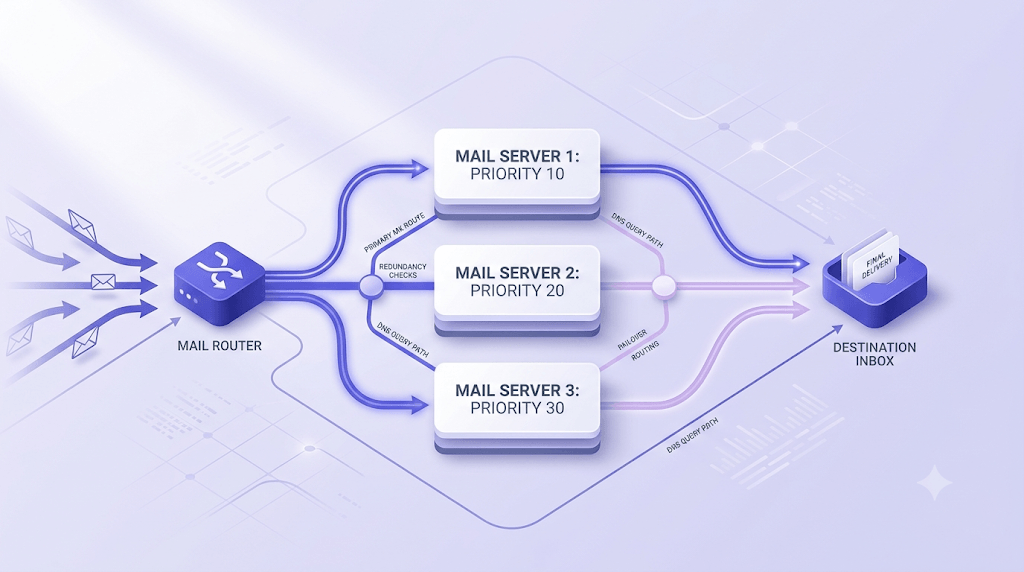
Your domain's MX record is the single DNS entry that decides whether inbound email reaches you — or disappears. Get it wrong and every message sent to your domain bounces silently, with no error you'll ever see on your end.
In the next few minutes you'll be able to run an MX record lookup from any device, read the output line by line, and know immediately whether your mail routing is healthy or quietly broken.
The part most guides skip: a misconfigured MX record doesn't just kill inbound mail — it can degrade your sender reputation, break DMARC reporting, and cause email verification to return Unknown results you'd otherwise never pay for.
What an MX record actually is
MX stands for Mail eXchange. It's a DNS record type that maps your domain name to one or more mail servers responsible for accepting incoming email on your behalf.
Every MX record has exactly two parts: a hostname (the mail server address) and a priority number (which server to try first). Lower priority numbers win — a server at priority 10 is preferred over one at priority 20.
Without at least one valid MX record, no inbound email can arrive at your domain. Period. Sending servers have no routing target to connect to, so they return a non-delivery report to the sender and move on.
MX records live in DNS alongside A, TXT, CNAME, and NS records — but they serve a distinct function. SPF, DKIM, and DMARC all deal with outbound authentication: they tell receiving servers whether your outgoing mail is legitimate. MX records handle the opposite problem: inbound routing. They answer the question "where should mail for this domain go?" not "is this mail from this domain trustworthy?"
For a deeper look at how SPF, DKIM, and DMARC work together on the authentication side, the PILLAR guide on email authentication covers the full stack.
How MX lookup works under the hood
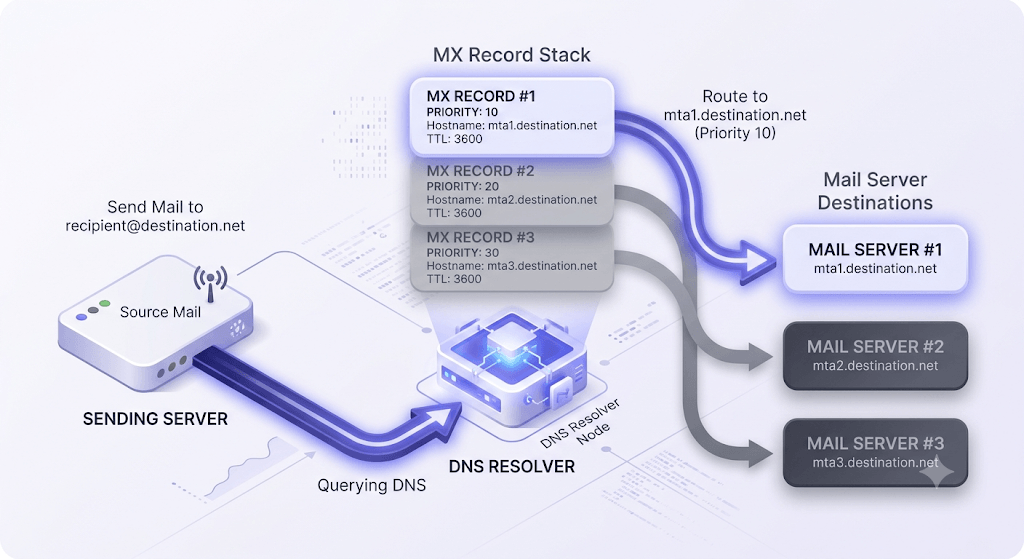
When a sending server has a message for user@example.com, it doesn't guess where to deliver it. It queries DNS for the MX records of example.com. The resolver returns all MX records sorted by priority value, and the sending server attempts an SMTP connection to the lowest-numbered host first.
If that connection fails — server down, timeout, refused — the sender falls back to the next record in the priority list. This is why having a secondary MX record matters: a single-record setup means a server outage blocks all inbound mail until the primary recovers.
The lookup hits your domain's authoritative name server, which means changes take effect as soon as the TTL (Time to Live) on the old record expires. The TTL is a number in seconds attached to every DNS record — it tells resolvers how long to cache the answer before asking again.
Here's where it gets confusing during migrations: public resolvers like Google's 8.8.8.8 or Cloudflare's 1.1.1.1 cache your old MX record until the TTL runs out. So your authoritative DNS might show the new record immediately while a resolver across the country still serves the old one. That gap is propagation, and understanding it saves hours of head-scratching when mail routing behaves inconsistently after a change.
The SMTP specification in RFC 5321 defines exactly how sending servers are required to handle MX lookups, fallback behavior, and SMTP connection sequencing — it's the authoritative source if you want the full protocol detail.
How to run an MX record lookup — three methods
Pick the method that fits your environment. All three return the same data — they differ only in where you run them.
Online tool (fastest, no terminal needed)
Paste your domain into Valid Email Checker's MX Record Checker and click lookup. You get the full MX record set — hostnames, priority numbers, TTL values — instantly. No command line, no DNS configuration, no installation. This is the right starting point for anyone who doesn't live in a terminal.
Windows — nslookup
Open a command prompt and run:
nslookup -q=mx example.com. Replaceexample.comwith your domain. The output lists each MX record as amail exchangerline with its priority. To query a specific DNS server rather than your system default, append the server address:nslookup -q=mx example.com 8.8.8.8.macOS / Linux — dig
Run
dig example.com mxin any terminal. The MX records appear under theANSWER SECTIONheader. Each line shows: domain name, TTL in seconds, record class (IN), record type (MX), priority number, and the mail server hostname. To query against a specific resolver:dig @8.8.8.8 example.com mx. The+shortflag strips everything except the priority and hostname if you want clean output fast.
One important distinction: querying your local DNS resolver (the default) returns cached results that may be hours old. Querying the authoritative name server directly returns the live record. To find the authoritative server for a domain, run dig example.com NS first, then query one of those nameservers: dig @ns1.example.com example.com mx.
For a broader view of all record types on a domain at once, the DNS Lookup tool queries any record type — A, TXT, CNAME, MX, NS — in a single interface.
Reading and interpreting your MX record output
Raw MX output looks like this:
;; ANSWER SECTION:
example.com.    3600  IN  MX  10  aspmx.l.google.com.
example.com.    3600  IN  MX  20  alt1.aspmx.l.google.com.
example.com.    3600  IN  MX  30  alt2.aspmx.l.google.com.
Reading left to right: the domain name, the TTL in seconds (3600 = one hour), the record class (always IN for internet), the record type (MX), the priority number, and the mail server hostname.
Priority numbers work on a simple rule: lower is preferred. A server at 10 gets the first connection attempt; 20 and 30 are fallbacks in that order. When two records share the same priority number, sending servers distribute load across them — that's round-robin load balancing, and it's intentional.
Common hostname patterns tell you immediately which provider is handling mail:
aspmx.l.google.com— Google Workspacemail.protection.outlook.com— Microsoft 365inbound-smtp.us-east-1.amazonaws.com— Amazon SES inboundmxext1.mailprotect.be— a third-party spam filter in front of the real mail servermx1.forwardemail.net— a forwarding service, not a full mail server
Red flags to look for in the output:
- No trailing dot on hostnames — technically valid in some tools, but in raw DNS output the absence of a trailing dot on a fully qualified domain name can indicate a misconfiguration depending on your DNS provider's zone file syntax.
- MX pointing to a CNAME — RFC 974 explicitly prohibits this. Some DNS providers silently allow it; delivery failures are unpredictable and hard to trace.
- Priority 0 with no fallback — a single record at priority 0 with nothing behind it means any server outage drops all inbound mail.
- MX host has no A record — if the mail server hostname doesn't resolve to an IP address, sending servers can't connect. Run
dig aspmx.l.google.com Ato confirm the host resolves.
TTL values matter during migrations. A 300-second TTL means resolvers flush the cached record every 5 minutes — fast propagation, but higher DNS query load. A 3600-second TTL means resolvers cache for an hour, so a change you make right now won't reach every resolver for up to 60 minutes. If you're planning a mail server migration, lower the TTL to 300 at least 24 hours before you make the switch.
The five most common MX record problems — and how to fix them
Most MX issues fall into one of five patterns. Here's what each looks like and what you do about it.
- No MX record at all. The domain receives zero inbound email. Sending servers return an NDR immediately. Fix: add the MX record(s) your mail provider specifies — Google Workspace, Microsoft 365, and most ESPs publish exact values in their setup documentation.
- MX points to a CNAME. RFC 974 prohibits this. The CNAME chain introduces an additional lookup that many sending servers refuse to follow, causing intermittent or total delivery failure. Fix: change the MX target to point directly to an A record hostname.
- Stale records after migrating to a new ESP. The old mail host is still listed; the new one is missing or has the wrong priority. Fix: add the new host first (at a higher priority number so it's a backup initially), confirm it's receiving mail, then remove the old record and adjust priorities.
- MX host has no A record. The mail server hostname exists in your MX record but doesn't resolve to an IP address. Sending servers can't connect and return NDRs. Fix: confirm the hostname resolves with
dig <hostname> A. If it doesn't, either the A record is missing or the hostname is wrong. - SPF misconfiguration alongside a working MX. Inbound routing works fine, but your outbound mail gets rejected because your SPF record doesn't include the IP addresses you're sending from. These are separate DNS records solving separate problems — a healthy MX doesn't guarantee a healthy SPF. Use the SPF Record Checker to verify your SPF configuration independently.
Don't confuse inbound and outbound problems
MX records only control where inbound mail goes. If your emails are going to spam or getting rejected on send, the problem is almost certainly SPF, DKIM, DMARC, or sender reputation — not your MX record. A broken MX affects what arrives in your inbox, not what leaves your sending server.
MX records and email deliverability — the connection most guides miss
Here's the part that almost never appears in MX record tutorials: a broken or missing MX record on your domain can silently damage your email deliverability, even when your outbound mail appears to work perfectly.
Receiving servers don't check your MX record when evaluating your SPF authentication — that check is against the sending IP in your SPF TXT record. But spam filters do look at overall domain health signals. A domain with no MX record, or one pointing to a dead host, reads as neglected or abandoned. Some filters weight that signal against you.
DMARC reporting is where the dependency becomes concrete. When you publish a DMARC policy with rua=mailto:reports@yourdomain.com, receiving servers send aggregate reports to that address. If the domain receiving those reports has a broken MX record, you never get the reports. You're flying blind on your authentication performance. Confirm your DMARC reporting addresses have working MX records using the DMARC Record Checker.
There's also a spamtrap angle. Many spamtrap domains have no MX record — they're set up specifically to catch senders who don't verify addresses before sending. A pre-send email verification check catches this class of bad address early, before it hits your bounce rate or flags you to a blocklist operator.
Catch-all detection in email verification depends directly on probing the MX host. The verifier sends an SMTP handshake to the mail server and observes whether it accepts any address at the domain. If the MX record is misconfigured or the host is unresponsive, the verification engine can't complete the probe — and the result comes back as unknown. That's a wasted credit, which is exactly why Valid Email Checker automatically refunds Unknown results. See how our verification engine works for the full 11-stage flow.
The broader point: MX record health is part of your deliverability stack, not separate from it. The pillar guide on email deliverability covers how list hygiene, authentication, and routing all interact.
Check an email address right now
Valid Email Checker runs an 11-stage verification — including MX probe, SMTP handshake, and mailbox-existence check. Unknown results are refunded automatically.
Powered by Valid Email Checker — full SMTP handshake, disposable + role detection, no card required.
MX lookup during DNS propagation — what to expect
"I changed my MX records but email still isn't working." Nine times out of ten, this is propagation in progress — not a misconfiguration.
DNS propagation isn't a broadcast. When you update an MX record, your authoritative name server has the new value immediately. But every resolver that cached your old record keeps serving it until its TTL expires. A 3600-second TTL means resolvers around the world may continue routing mail to your old server for up to an hour after you make the change. Some poorly configured resolvers ignore TTLs and cache longer.
During this window, some senders reach the old server and some reach the new one. Both should accept mail temporarily. That's why the recommended migration sequence matters:
- Lower the TTL on your existing MX record to 300 seconds, 24–48 hours before the planned switch.
- Make the change — add the new MX record, remove or deprioritize the old one.
- Wait for the old TTL (the original higher value) to expire across the resolver network.
- Confirm propagation using a tool that checks multiple global resolvers — not just your local DNS cache.
- Once propagation is confirmed, raise the TTL back to 3600 or higher to reduce DNS query load.

To check propagation status, the DNS Propagation Checker queries resolvers across multiple geographic regions and shows you which ones have the new record and which are still serving the old one. Your local dig command only tells you what your machine's resolver sees — that's not representative.
If propagation is complete and mail still isn't working, then you have a genuine misconfiguration. The most common culprits at that point: the new MX host has no A record, the mail server isn't accepting connections on port 25, or the new host requires additional configuration (like pointing your domain's SPF record to include it) before it will accept mail for your domain.
Automating MX lookups — API and bulk use cases
A single MX lookup is a diagnostic tool. At scale, it becomes infrastructure.
Three scenarios where you need MX lookups in bulk or programmatically:
- Pre-outreach domain validation. Before sending cold email to a list of domains, you want to confirm each domain has a working MX record. A domain with no MX record will hard-bounce every address — and enough hard bounces will put your sending IP on a blocklist. See cold email list verification for the full pre-send checklist.
- Transactional pipeline validation. In a sign-up flow, a quick MX check at the point of capture catches mistyped domains before they enter your list. No MX record = no valid email addresses at that domain = don't accept the input.
- DNS health monitoring. If you manage domains for clients, automated MX checks catch record deletions or misconfigurations before anyone notices that inbound mail stopped.
Here's the important distinction: an MX lookup tells you whether a domain can receive email. It does not tell you whether a specific mailbox exists. user@example.com could still be invalid even if example.com has a perfect MX record. That's why MX checking is one stage in a full verification flow, not the whole thing.
Valid Email Checker's verification API handles this in a single call. A POST to /functions/v1/api-verify-single returns the MX status alongside the SMTP handshake result, mailbox-existence probe, catch-all status, and the final classification — all in one response. For bulk lists, /functions/v1/api-verify-bulk accepts up to 50,000 addresses per task and uses a queue-and-poll model so you're not blocking on a long-running HTTP connection.
curl -X POST https://validemailchecker.com/functions/v1/api-verify-single \
  -H "Authorization: Bearer YOUR_API_KEY" \
  -H "Content-Type: application/json" \
  -d '{"email": "user@example.com"}'
The auto-refund on Unknown results matters specifically here. If the MX host is unresponsive during a bulk verification run — say, a mail server is down temporarily — the verification engine can't complete the SMTP probe and returns unknown. Valid Email Checker automatically refunds that credit. You don't pay for results the engine couldn't produce. Most verifiers charge you anyway. See the refunds and credit returns guide for how this works in practice.
For the full API documentation including authentication, rate limits, and response schemas, the API overview and developer page cover everything you need.
Free tool · no signup
Check your MX records instantly
Paste any domain and see the full MX record set — hostnames, priority numbers, TTL values — in one click.
Free tool · no signup
Query any DNS record type
A, MX, TXT, CNAME, NS — look up any record for any domain from a single tool.
MX record health is one input into a broader deliverability picture. A working MX is necessary but nowhere near sufficient — your email list hygiene, authentication stack, and sender reputation all interact. The fastest way to see where your list stands is to run a sample through verification and read the failure mix. The tool above handles it, and the first 200 verifications are free.
Frequently asked questions
What is an MX record and why does my domain need one?
How do I look up MX records on Windows, Mac, and Linux?
nslookup -q=mx yourdomain.com from a command prompt. On macOS or Linux, run dig yourdomain.com mx in a terminal — the records appear under the ANSWER SECTION. You can also use an online tool like Valid Email Checker's MX Record Checker if you don't want to use a terminal.What do the priority numbers in MX records mean?
Why is my MX record showing a CNAME and is that a problem?
How long does it take for MX record changes to propagate?
Can a misconfigured MX record hurt my email deliverability?
What is the difference between an MX record lookup and an email verification check?
How do I check MX records for multiple domains at once?
Try Valid Email Checker free
Verify any email in under a second
Get 150 free verifications. No credit card. Auto-refund on every Unknown result — the only verifier we know that does this.
- 150 free credits when you sign up
- Auto-refund every Unknown verification (we're the only ones that do)
- 11-stage flow catches what 1-step checkers miss
- Drop-in integrations for Mailchimp, HubSpot, SendGrid, 14 more
Written by
Devon ParkDevon writes about the parts of email nobody puts on a landing page: SPF, DKIM, DMARC, MX records, and the DNS quirks that quietly decide whether your mail lands or bounces. His aim is to turn specs that read like legalese into something you can implement today — usually with the exact record to copy and a way to confirm it worked. When other guides hand-wave past setting up authentication, Devon stops and shows you how.